


New Participant
March 14, 2018
Answered

Enable Multiple Page Selection - Organize Pages toolbar

  • March 14, 2018
  • 1 reply
  • 4804 views

My co-worker has this option at the bottom of the screen when she opens the Organize Pages toolbar in Adobe Acrobat Pro DC.  We have the same version of Adobe (2015.006.30417).  How do I enable this in my Adobe.
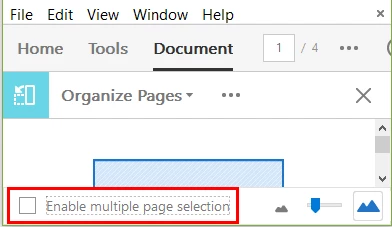
Thanks for your help!!

This topic has been closed for replies.
Correct answer Bernd Alheit

In the preferences of Acrobat under "General" activate the touch mode.

1 reply

Bernd Alheit
Bernd AlheitCorrect answer
Community Expert
March 15, 2018

In the preferences of Acrobat under "General" activate the touch mode.

New Participant
March 27, 2018

Is there a way to "permanently" check this box, and only uncheck it in the event you do not want to enable multiple page selection?

AnandSri
Community Manager
Community Manager
April 26, 2018

Hello Ashleyg,

Sorry for the delayed response and inconvenience caused. You can choose Touch Mode option as Always in Edit>Preferences>General.

Feel free to update this discussion for any further assistance.


Regards,Anand Sri.