

New Participant
May 19, 2022
Question

Erreur script page

  • May 19, 2022
  • 2 replies
  • 2153 views

Bonjour, 

Un message d'erreur s'affiche dès que j'ouvre un PDF:
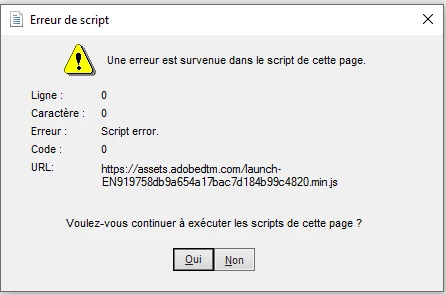
Aucune solution trouvée à ce jour par notre service informatique.


Merci,

Caroline Abram

This topic has been closed for replies.

2 replies

JR Boulay
Community Expert
May 20, 2022

Ce n'est pas le logiciel Acrobat qui affiche cette erreur.

Acrobate du PDF, InDesigner et Photoshopographe
New Participant
May 20, 2022

Bonjour,


C'est bien le logiciel Acrobat qui affiche cette erreur.

En fait il cherche à se connecter à mon compte Adobe mais il semble ne pas y arriver et affiche ce message.

Quand je vais dans Aide-> Se connecter j'ai ce message d'erreur (voir image)


Merci

bebarth
Community Expert
May 20, 2022

Celui-ci oui, mais pas le précédent !

Comme indiqué, c'est un problème de droit d'accès que ton service informatique devrait pouvoir régler... si tu as un compte Adobe adéquat.

@+

Harsh Vardhan Pareek
Community Manager
Community Manager
May 20, 2022

Hi @Caroline24522113y0kg 


Hope you are doing well.

As per the issue description that you are getting the above error while viewing a PDF. Would you mind sharing a few more details to understand the issue better?

  1.  Is it happening with all the PDFs or with only one PDF?
  2. Application version?
  3.  Is this PDF on a shared drive?

Make sure that the app is updated to the latest version.


We are looking forward to hearing back from you.


Thanks,

Harsh

New Participant
May 20, 2022

Hi Harsh, 

Thank you for your feedback, here some details :

1. Yes happening with all the PDFs, but only at the first opening. When an adobe window is already opened, no pop-up for further openings

2. Version 22.001.20117/64bits

3. Indeed, I only work with documents registered on shared drive or remote server. I tried with a PDF registered directly on my computer, same pop-up... But I am always synchronized with my OneDrive.

An update was done by our IT services.

Caroline

bebarth
Community Expert
May 20, 2022

bonjour,
C'est apparemment un message d'erreur Microsoft Team, et non Adobe Acrobat !
Pour la solution, voir : https://toptips.fr/une-erreur-sest-produite-dans-le-script-sur-cette-page-microsoft-teams/

@+