


February 28, 2016
Answered

%%[ Error: invalidfont; OffendingCommand: xshow

  • February 28, 2016
  • 7 replies
  • 153012 views

When printing to the PDF driver this error happens and the print is not completed. 

%%[ ProductName: Distiller ]%%

XB9A2A82D not found, using Courier.

%%[ Error: invalidfont; OffendingCommand: xshow ]%%

Stack:

[85 94 94 39 93 47 63 46 86 47 39 0]

(           

  )

0.0

[]

10.0

1

1

1.0

false

%%[ Flushing: rest of job (to end-of-file) will be ignored ]%%

%%[ Warning: PostScript error. No PDF file produced. ] %%

How is the error fixed?

Thanks,

Carl
Correct answer YatharthS

Hi,


Please check whether is there any update available for the software after going through "help > check for updates "

Follow this thread to reset the preferences for the Acrobat software :- How to reset Preference settings in Acrobat.


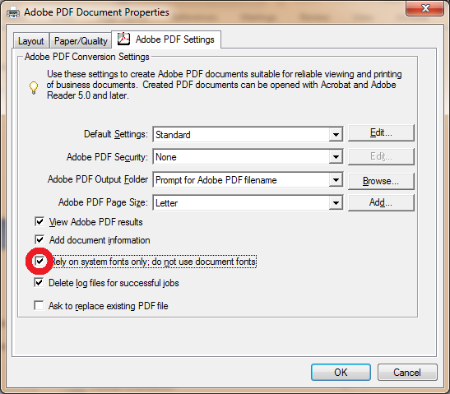
This error can be resolved by changing one of the Adobe PDF printer settings.

  • When you are in the print dialog, and you have selected the appropriate PDF printer, select "Properties."
  • In the dialog box, there should be a tab titled "Adobe PDF Settings," and it should look like the below image.

  • Un-check "Rely on system fonts only; do not use document fonts."

Click OK,then quit & relaunch the application.

Let me know if it works.


Regards,

Yatharth

7 replies

New Participant
September 12, 2024

I just got the same error and this solution worked, in 2024 🙂

New Participant
February 13, 2024

This worked for me, though the main difference is that restarting Word made the unchecked box change go away. So I did NOT restart Word after unchecking the "Rely on system fonts only; do not use document fonts." box, and I was able to FINALLY create a PDF ... #goodgrief 

New Participant
February 10, 2024

I had to remove the latest update as the invalid font TI30EmuKeys did allow my documents to print. I write materials for GED math students and this font is a necessary font.

New Participant
September 12, 2023

I am having the exact same problem. Nightmare scenario. Completely unable to create PDF's no matter which way round I do it. From Acrobat, from Word, Print, Export, my COM ADDIN is now gone too. Is it my computer that's the issue? I am starting to think so and am running a full system scan. Please help!!

New Participant
July 30, 2020

This works! My problem is finally solved!

New Participant
November 15, 2019

It didn't work on win10 Edge browser.

YatharthSCommunity ManagerCorrect answer
Community Manager
February 28, 2016

Hi,


Please check whether is there any update available for the software after going through "help > check for updates "

Follow this thread to reset the preferences for the Acrobat software :- How to reset Preference settings in Acrobat.


This error can be resolved by changing one of the Adobe PDF printer settings.

  • When you are in the print dialog, and you have selected the appropriate PDF printer, select "Properties."
  • In the dialog box, there should be a tab titled "Adobe PDF Settings," and it should look like the below image.

  • Un-check "Rely on system fonts only; do not use document fonts."

Click OK,then quit & relaunch the application.

Let me know if it works.


Regards,

Yatharth

New Participant
January 7, 2025

Fix is alive in 2025!