


wadeh80369483
Participant
March 25, 2019
解決済み

Error - The document could not be saved. There was a problem reading this document (105).

  • March 25, 2019
  • 返信数 21.
  • 644590 ビュー

I just registered and installed Adobe Acrobat Pro DC and I cannot save PDF files.
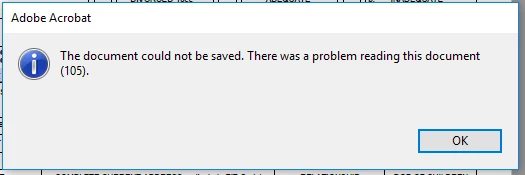


I decided to try the trial period because I was so frustrated with the lack of functionality in Adobe Reader.  I need to be able to sign documents, and even when DC reader works, it takes minutes to open a single document.


First, I uninstalled DC Reader.  That took about a half hour.


Next I signed up for the trial period.  I was surprised that Acrobat was so difficult to download.  I had to attempt a few browser tricks before I could even start the download.


After finally installing Acrobat Pro, I was unable to save PDF files.  I've tried multiple files and tried saving them to new locations, but I get the same error.


To add insult to injury, I couldn't contact tech support because I haven't registered my product.  (That sounds like an error I'd get back when people bought software in a box at the local office store.)


Please either help me resolve this issue or cancel my trial period immediately.  I have no desire to pay for a product that doesn't work and isn't supported.

解決に役立った回答 mknowlesnc

I had the same error.  i was able to make it go away by:

Tools > Organize Pages

Extract Pages - select the pages i want to create a new document

Save As

Pain the the rear, but it worked.

返信数 21

Participant
January 18, 2023

I have a 2 userswithin my company attempting to fill out some lines in a PDF that is a fillable form, then save that PDF, using the 'Save as...' function. This is happening with multiple of the same file.


Error when attempting to save the file:

More information when holding Ctrl and clicking OK:


Computer Information:

OS: Windows 10

Adobe Version: Latest Version of Adobe Acrobat


I have seen workarounds in other community posts, but I am seeking a fix rather than a workaround if possible. Any help would be appreciated.

Participant
July 18, 2022

Whenever I signed the document digitally and tried to save it, this error message kept popping up. I tried to find the cap file and give more permission, but I couldn't find the cap file. I need help. 

Eric Dumas
Community Expert
Community Expert
July 18, 2022

Hi,

Can you confirm:

- the version of the software and operating system

- the location of the original file (email, local, network, cloud...)


Have you checked https://community.adobe.com/t5/acrobat-reader-discussions/finding-the-signature-file-on-my-c-drive/td-p/9706140 for Windows OS

or https://community.adobe.com/t5/acrobat-discussions/digital-signture-file-location-mac-os-x-10-11-6/td-p/9567005 for Mac OS

Thanks

Participant
July 18, 2022

Hi,


I am using Windows 11 and the location of the file is on desktop/cloud. I'm referring to the certificate based digital id. I chekced the link you sent, but I am lost after username portion of the command. I can't find the AppData file.


Thanks for the help 

Participant
April 26, 2022

Hi,

I am getting an error attached below while compressing and saving my pdf file.

Participant
March 5, 2022

please help me to resolve this

Luke Jennings3
Community Expert
Community Expert
March 5, 2022

This issue may be related to comments in the pdf. Try running a preflight profile to convert to PDF/X-4, this may clear out the problem. (Tools> Print production> Preflight> Select profiles> Find "convert"). If that doesn't work, you could open the pdf in the Chrome browser, or another non-Adobe pdf viewer and resave, however, you may loose any comments or other pdf functionality. Here are links to related discussions:

https://community.adobe.com/t5/acrobat-discussions/how-to-fix-there-was-an-error-processing-a-page-there-was-a-problem-reading-this-document-135/td-p/7875173

https://community.adobe.com/t5/acrobat-reader-discussions/help-showing-error-message-135-when-trying-to-save-as/td-p/11221157


Participant
February 10, 2022

2022 and we still have 105 problems! I followed the steps but after Organize Pages I didnt get the Extract option. 

Tools > Organize Pages - Open - Extract Pages

That's the only extra step I had to do, I was able to sign and save my documents after.


Thank You!!

Bevi Chagnon - PubCom.com
Legend
March 14, 2022

In our PDF, the error was caused by an glitch in XFA, Adobe's form technology from Adobe LiveCycle Designer.

Although a bit dated by now, XFA is a powerful form technology that sometimes isn't compatible with Acrobat itself, and I think that's what caused our 105 error.


Our solution:

  1. Fill out the form.
  2. Rather than saving it, Print to Acrobat PDF (File / Print / Adobe PDF as the printer).


If you need to sign the form, open the "printed" PDF, sign it, and re-save the it.


|    Bevi Chagnon   |  Designer, Trainer, & Technologist for Accessible Documents ||    PubCom |    Classes & Books for Accessible InDesign, PDFs & MS Office |
Participating Frequently
January 29, 2022

My solution was to open up the PDF at issue > Click File > "Save as Copy" (note not save as) and give it a new name to save it to your directory.   Open it up and use the new version and test it.  That seem to work for me especially for a PDF with form fields that was secured.

Participant
January 2, 2022

Extract files is greyed out and cannot be selected. I spent and hour editing a document, and then get this when I tried to save it.


Adobe - if there was a problem reading the file, tell the user before they spend potentially hours working on it only to find when then go to save it that there was  problem reading the file. This is so bad, it's comical (difficult to laugh then when I lost an hour of my life due to this issue). 


Participant
September 27, 2021

I use Acrobat Pro DC, and received the same error.  Given that this in only a 1 page document, none of solutions apply.


A response from Acrobat regarding this issue would be appreciated.


Arthur Johnston


Participant
October 4, 2021

Re-installing Adobe Pro DC, resolved the issue.


Arthur Johnston

AnandSri
Community Manager
Community Manager
September 24, 2021

Hi!


Let us know if you are still experiencing this issue with the latest version of the Acrobat/Reader DC version: 21.007.20091 Planned update, Sept 14, 2021


If yes, would it be possible to share a sample PDF file on which you are experiencing this issue along with a screenshot of the error or if possible a video recording?

Also, the current version of the OS is installed.


Regards,

Anand Sri.

Participant
October 1, 2021

I tried all the above. Happy to share the PDF if you tell me how to do that. Using Adobe Pro DC 32 Bit with most recent update on Windows Enterprise 10 build 18363.

Could it have something to do with the length of the filename and/or that it included _ character?

My co-author was getting the same message with the file working on her computer. At first when I got the message I found that it was saving anyway in spite of the message. But now it doesn't seem to be saving at all.

Participant
October 11, 2021

After posting my message, and trying all the previous suggestions, it occured to me to try sharing the pdf with my collaborator via the Adobe Document Cloud, i.e. saving it to the Cloud, and it worked. WHY it worked I have no idea, but definitely worth a try for others 🙂

Participant
September 2, 2021

Thanks it worked for me also