


Participant
June 22, 2023
Answered

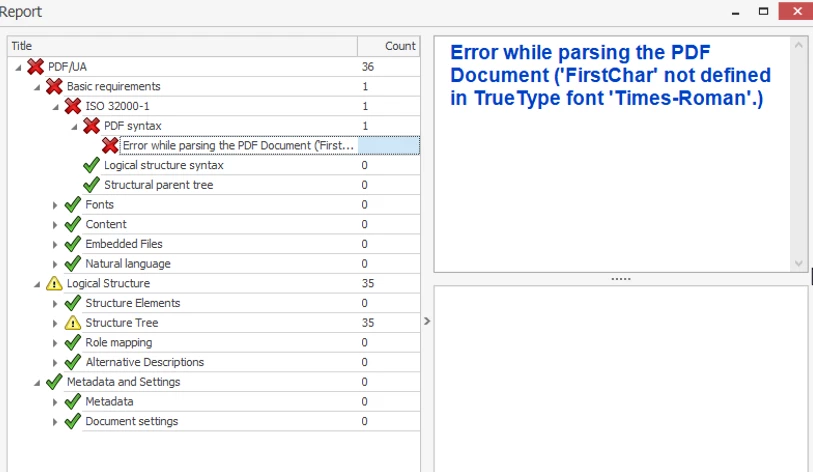
Error while parsing the PDF Document ('FirstChar' not defined in True Type font 'Times-Roman'.)

  • June 22, 2023
  • 2 replies
  • 4612 views

Hi all,


I am hitting a wall trying to make a pdf ADA compliant - specifically having it pass the PAC 3 checker. I created the pdf in InDesign, brought it into Acrobat, ran 'Make Accessible' then manually cleaned/corrected tags and annotations, and ran 'fix' on 'missing embedded fonts' in the Preflight setting. And still, I am running into this persistent error under 'PDF Syntax'. What's worse is that I can't figure out where 'Times-Roman' is even being used in the Document. It's not showing up in embedded in fonts when I click 'Optimized PDF' but it shows up under 'fonts' in Document Properties.


I have spent an embarrassing amount of hours googling every possible iteration of this issue, and still I have no clue how to solve it. Any heroes out there?

Thank you kindly,


Tom
 

Correct answer Julia31450306ro45

Hi Tom,

I just got the same error and was able to solve the problem. I'm not quite sure what exactly caused it, but the error message no longer came up with pac3.

So with me the error message came after I wanted to embed the fonts with preflight.
I repeated this step with a file version before the error message and after the correction with preflight was carried out and the window for saving opened, I left the file name the same and overwrote the old file version with it. Then I saved the file again in adobe itself under a new name. And I don't know why but the error message no longer appeared in Pac3. So I hope this maybe can help you with our problem.

2 replies

Julia31450306ro45Correct answer
Participant
August 2, 2023

Hi Tom,

I just got the same error and was able to solve the problem. I'm not quite sure what exactly caused it, but the error message no longer came up with pac3.

So with me the error message came after I wanted to embed the fonts with preflight.
I repeated this step with a file version before the error message and after the correction with preflight was carried out and the window for saving opened, I left the file name the same and overwrote the old file version with it. Then I saved the file again in adobe itself under a new name. And I don't know why but the error message no longer appeared in Pac3. So I hope this maybe can help you with our problem.

Participant
September 5, 2023

This worked for me. I have some helvetica and times new roman hidden somehwere (likely in one of the GIS-generated maps) in a 400-page document. Thank you!

Participant
June 29, 2023

I should also add - I created this pdf a year ago and had no issue running it through the ADA compliance process at the time. I had to update a few photos recently, and then when I put it through the same process, ran into this syntax error. Specifically, the error seems to get created after I put the pdf through Preflight > Document Info and Metadata > Set PDF/UA-1 entry, in order to solve the missing PDF/UA identifier issue I was running into in PAC 3. My understanding is the issue I am having is tied to the 2023 update of Acrobat, but from what I understand, Acrobat is not one of the apps that Adobe offers older versions of through my CC plan.