


Errors with some fonts
Hi,
A person from our company keeps encountering font errors such as Helvetica, Arial-BOLDMT, and TimesNewRomanPSMT when opening certain PDFs in Acrobat Pro. The specific error example is: "Cannot find or create the font 'Helvetica'. Some characters may not display or print correctly. A drawing error occurred." This issue persists even after updating Acrobat to the latest patch. See screenshot below for reference.
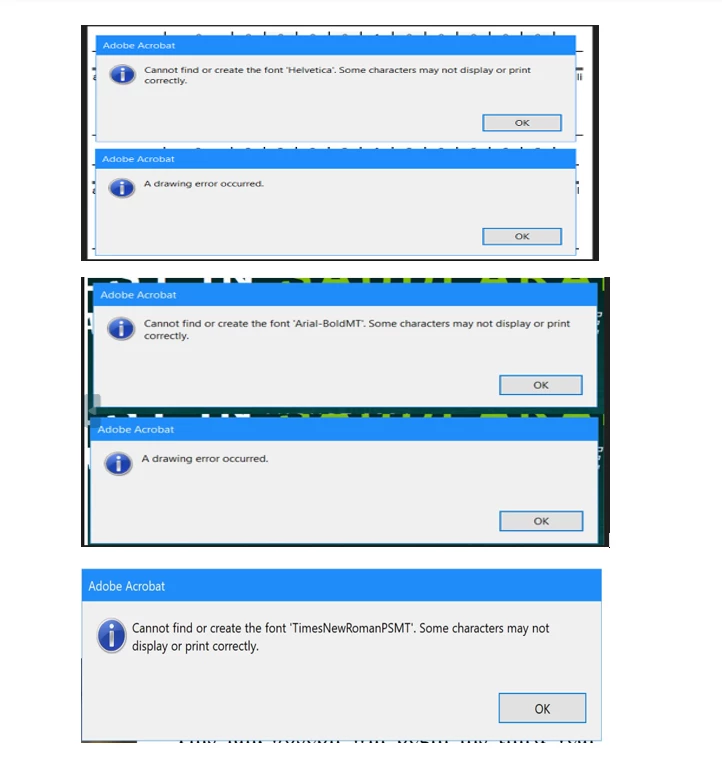
To address the font issue, I added a custom font service in the Admin Console. I uploaded the missing fonts to the cloud and added both myself and the affected users to the custom font product profile. This solution appears to require Creative Cloud to be installed on the affected users' machines, so the missing fonts can be embedded in Acrobat. However, no other features should be visible or accessible to the users except for the font functionality.
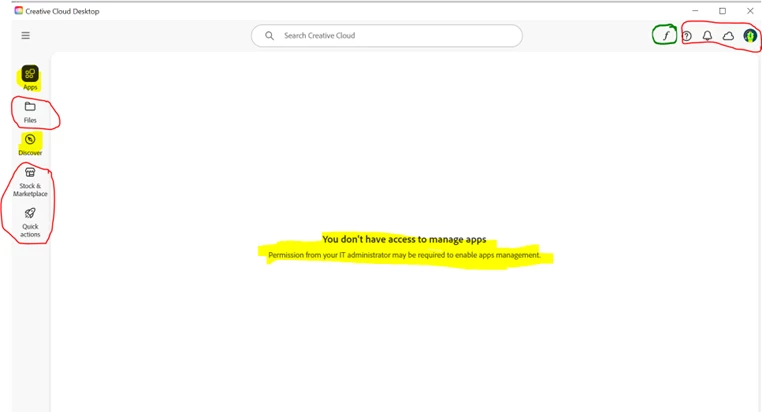
I was able to lock "Apps" and "Discover" by modifying the serviceConfig.xml file at "C:\Program Files (x86)\Common Files\Adobe\OOBE\Configs\ServiceConfig.xml", but I couldn't lock other features. I reached out to Adobe support, and they mentioned this could be considered a feature request. The red-circled areas in the screenshot are the ones I would like to either lock or make invisible, if possible.
Does anyone have an alternative solution to tackle this problem, or could this feature be added to future releases? I would greatly appreciate any feedback.
Thanks!
Subject edited for clarity. Was "The ability to disable certain features from Creative Cloud Desktop app."
 AdChoices