


al-qorasani
New Participant
July 7, 2020
Question

Excel footer doesn't appear on PDF when converting to Adobe PDF

  • July 7, 2020
  • 1 reply
  • 4907 views

Hi everyone,

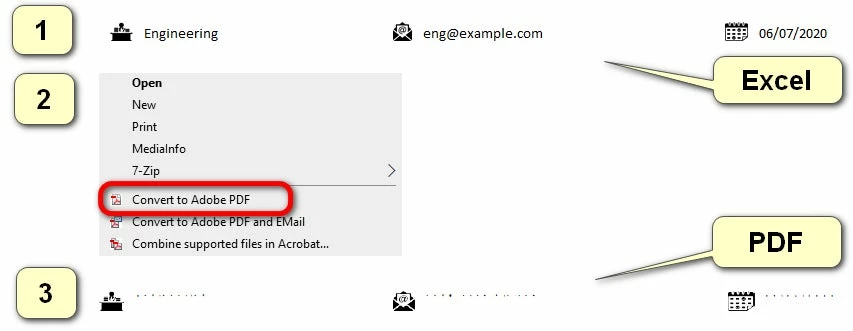
I have created a footer on an Excel file with some images and a text. When I convert it to a PDF file using Adobe Acrobat, I can see the images, but not the text. When I do normal "Save as" and choose ".pdf" directly from Excel, everything works fine though.

Did anyone encounter with this issue before and do you know how to fix this?
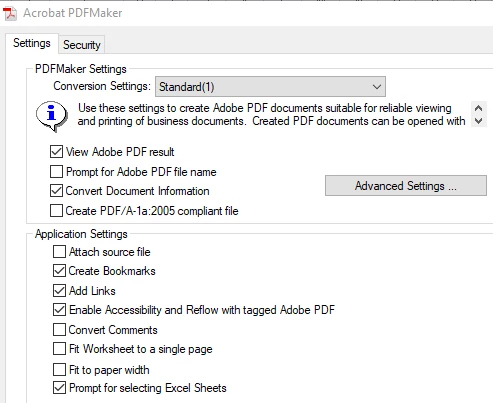
Here are Acrobat PDFMaker settings:
P.S. Using "Save as" from Excel is not convenient when converting a lot of Excel files. When using Adobe Acrobat I can convert as many files at a time.

This topic has been closed for replies.

1 reply

Dave__M
Community Expert
July 7, 2020

I wonder if it's a scaling issue, and it is just not all fitting on the PDF page. Have you tried ticking the 'Fit Worksheet to a single page' or 'Fit to paper width' option to see if it all shows up that way?   Might be worth a  try.

My best,

Dave

al-qorasani
New Participant
July 8, 2020

Hi Dave,

Thank you for your response, however, neither of the options worked for me. I have attached an example.xlsx file to my initial post and would appreciate if you could have a look into it. Thank you very much.

Dave__M
Community Expert
July 8, 2020

OK... this is getting more interesting.  I opened your Excel file, did a Save as, and went to the Acrobat ribbon in Excel.

In the Preferences there, I turned on Fit Worksheet to a single page.  Then I hit the Create PDF button.  Here is a screenshot of the  bottom/footer of my result:

I am seeing both text and images in the page footer.  From my desktop, right clicking on the XLS file, and choosing Convert to Adobe PDF yields a similar result.

What more can you tell me about your software & process you used?


My best,

Dave