


Participating Frequently
March 19, 2019
Question

Excel print to PDF - shaded cells not printing

  • March 19, 2019
  • 5 replies
  • 20174 views

Hi all, I have an excel workbook with shaded cells and when I print to pdf they do not show. I have explored all the forums and none of the solutions work. I have tried Page Layout > Page Setup > Sheet > unchecked 'Black and White' and it doesn't work.

See example of the excel spreadsheet, and the resulting pdf. The font colours do print to pdf, it's just shaded cells.

This happens whether I do File > Print > Adobe PDF OR File > Save as Adobe PDF.
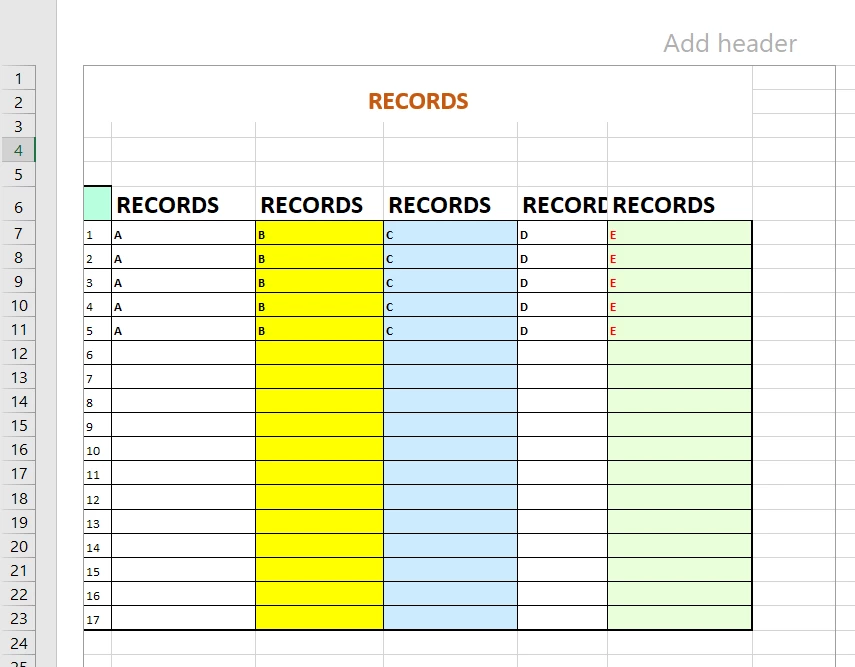
This topic has been closed for replies.

5 replies

New Participant
July 17, 2024

I have the exact same issue. The problem is not PDFMaker and your colors are working properly. Just open/read the pdf documetn in a browser or have someone else open the file. The problem I discovered was the Adobe Pro XI "reader".

Solution - Change the default reader to a browser (i.e. Chrome or Edge). <R-C> "Edit with Adobe Arcabat" to make pdf edits.

New Participant
November 24, 2019

Different PDF programs, different results, different settings.

Here's what I've found, which I think will provide a clue,
so you can figure out what's going on with what you have.

- - - - - - - - - - - - - - - - - - - - - - - - - - - - - - - - - - - - - - - - - - - - -

Excel 2010, Version: 14.0.7237.5000 (32-bit)
Page Layout / Themes / Office
Fill Color / The very top right, the first, lightest Peach

Printer: hp LaserJet 1320 PCL 5

PDF Software: Foxit Phantom Business, Version: 8.3.10.42705

- - - - - - - - - - - - - - - - - - - - - - - - - - - - - - - - - - - - - - - - - - - - -

Example 1

When I {print directly from Excel to the printer}, this fill color is good to highlight things.
It's not too light - and not too dark, which saves toner

- - - - - - - - - - - - - - - - - - - - - - - - - - - - - - - - - - - - - - - - - - - - -

Example 2

Ctrl+1 / Format Cells / Border / The very top left, the 2nd border down

I have one column in a Worksheet with this border, that goes down all 5 pages

Problem:
1.) When I {print directly from Excel to the printer}, my Cell Borders don't print.
2.) When I print from Foxit (explained next), the Fill Color becomes way too light

Here's the fix:

- - - - - - - - - -

Previously, I determined that the easiest fix to get Cell Borders, was to just print from a PDF:

File / Print / Page Setup / Page / [dot] Adjust to 99%
. . . Otherwise, it cuts off the bottom of the bottom cell, at the bottom of each page

File / Print / Page Setup / Margins / [un-check both] Center on page, horizontally / vertically
. . . How does this setting affect Cell Borders? No idea, but at some point, I noticed that it did.

File / Print / Print to Microsoft Print to PDF
. . . You will now be able to see your Cell Borders, printing from the PDF

- - - - - - - - - -

But, why don't I see my Fill Color now?

Foxit Phantom / File / Print / [un-check] Auto-Center
. . . It didn't look good centered

Foxit Phantom / File / Print / [un-check] Print as image . . . [I think this is the fix]
. . . I previously had this checked, to prevent garbage characters from being printed

. . . Toggle it as necessary

- - - - - - - - - - - - - - - - - - - - - - - - - - - - - - - - - - - - - - - - - - - - -

Bevi Chagnon - PubCom.com
Brainiac
November 25, 2019

FYI, different PDF making software programs will create different results. Maybe not as widely different as described above, but different nonetheless.


The open source PDF standard (ISO 32000 https://www.iso.org/standard/51502.html  and https://www.pdfa.org/resource/iso-32000-1-pdf-1-7/ ) can be used by any software manufacturer.  However, as with any standard, there's room for interpretation and you'll get different results from different PDF software. And there are just plain errors and deficiencies in the programs, too.


Try various major PDF software programs to determine which will give you the results you want:


My firm tests various PDF making programs and has been involved with the development of Acrobat since the beta of Acrobat 1.0.  I'm also on the ISO standards committee for PDF.


Our recommendations today:

  • For quality printing and press work, Adobe's products are far superior.
  • For accessible tagged PDF per the PDF/UA-1 standard, Adobe's products are superior (but not perfect), but some Word documents export fairly well with MS's internal PDF export (File / Save As / PDF).
  • For everything else, use whatever works for you.


|&nbsp;&nbsp;&nbsp;&nbsp;Bevi Chagnon &nbsp;&nbsp;|&nbsp;&nbsp;Designer, Trainer, &amp; Technologist for Accessible Documents ||&nbsp;&nbsp;&nbsp;&nbsp;PubCom |&nbsp;&nbsp;&nbsp;&nbsp;Classes &amp; Books for Accessible InDesign, PDFs &amp; MS Office |
New Participant
November 25, 2019

Interesting, thx!  What kind of programming bug makes it so your Cell Borders don't print as expected?  I've seen that others have this question online.

Luke Jennings
Inspiring
March 27, 2019

How does the PDF look in Adobe Reader?

Do you have your Acrobat page display preference- Use overprint preview setting set to Always?

Participating Frequently
March 28, 2019

Hi Luke

My Acrobat page display preference - 'Use overprint preview setting' was NOT set to Always. It was set to 'Only PDF/X-5 compliant ones.' I have now changed it to Always, however I still get the same results when converting to pdf, it hasn't solved the issue.

In regards to Adobe Reader, I asked a colleague, who only has Adobe Reader, to open the pdf on their computer and it displays as it should, all coloured cells show up. When I open the exact same pdf in my Adobe and they are not shaded...

Participating Frequently
March 28, 2019

I have been working in Microsoft Powerpoint this afternoon and, interestingly, some shaded cells are not printing to pdf for me, which would suggest it's an Adobe issue not excel? Even more strange, I am using a particular shade of green and some of these green shaded cells print to pdf, and some don't, despite being the same colour. See screenshots below.

jane-e
Community Expert
March 23, 2019

Hi

What happens when you choose the Acrobat tab from the Ribbon and use PDFMaker to create the PDF from there?

Jane

Participating Frequently
March 27, 2019

Hi Jane

When I choose the Acrobat tab and use PDFmaker to create the PDF I get the exact same result as using the other method.

Eric Dumas
Community Expert
March 20, 2019

Hi,

Can you confirm the Operating System you are using and the version of Excel / Acrobat you have?

I 'printed' to pdf a couple of documents I have and it worked fine. Does the print preview show the colours?

Can you include screen shots to show the printing steps you are taking?

Participating Frequently
March 20, 2019

Hi

Operating System: Windows 10

Microsoft Excel for Office 365

Adobe Acrobat XI

Yes the print preview shows the colours, see attached screen shots. I get the same result when doing File > Save as Adobe PDF.

Note on this example some of the shaded colours print while others do not.

Step 1: Excel file showing coloured cells

Step 2: File > Print > Save as PDF (Print preview shows coloured cells)

Step 3: PDF does not show all shaded cells

Eric Dumas
Community Expert
March 21, 2019

That is so weird, does this happen to the same colour, if you change them around. Check

the Acrobat tab > Acrobat settings in Excel to see if any cell formatting is set to be 'ignored'