


New Participant
November 8, 2024
Question

Expanding Word track changes comments in Adobe pdf

  • November 8, 2024
  • 1 reply
  • 685 views

Hi, 

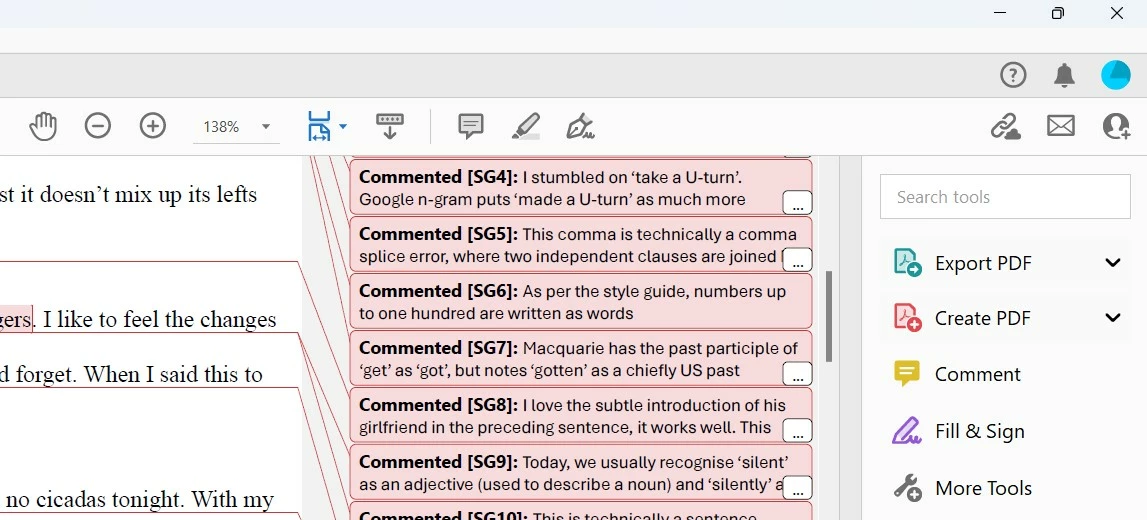
I have converted a Word document with changes tracked into a pdf. I am viewing the pdf in Adobe Acrobat. It all shows up ok, except that I can't see how to expand the comments that are too long to fit on the page. The long comments show a '...' in the corner, but when I click on it nothing happens. I feel I must be missing something simple to expand the comments. Any help much appreciated, thanks!
This topic has been closed for replies.

1 reply

try67
Community Expert
November 8, 2024

Do these comment also appear as such when you open the Comment panel in Acrobat? If not, they have been converted to static objects and can't be expanded or interacted with, like you can in Word.

New Participant
November 8, 2024

No, they don't appear when I open the Comment panel. Is there a way to convert the Word doc to pdf that will convert the Word comments into Adobe comments so they can be interacted with? Thank you!

try67
Community Expert
November 8, 2024

The only way it might work is by using the Create PDF command from the Acrobat ribbon, but honestly I think it will just apply them, then create the file with those changes (or ignore them entirely). Worth a try, though.