


Participant
March 11, 2021
Question

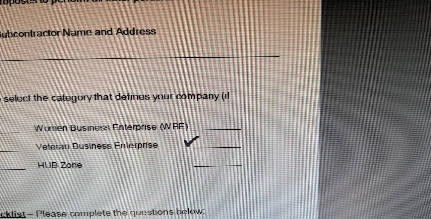
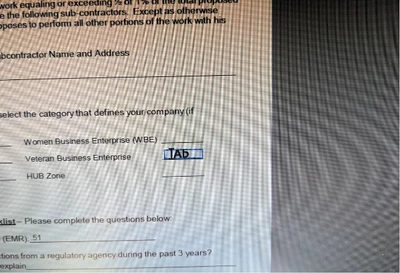
Fill & Sign "checkmark" automatically switches to text when hovering over field.

  • March 11, 2021
  • 1 reply
  • 1595 views

How can I stop this feature/turn it off? It's really annoying to have to constantly click beside a field and drag a checkmark or X over to a line or box because Adobe insists on being helpful.


1 reply

AkanchhaS8194121
Legend
March 19, 2021

Hi Jason,


Hope you are doing well.

If we understand correctly, your concern is, that you have had to drag the check-marks to the actual position manually, rather than it is being placed to the correct place automatically. Right?


How exactly this form was created? Is it a fillable form, or just a form with the place to add text.

Scenario 1- If its a fillable form, which has created using Acrobat's "Prepare Form" tool and assigned fillable fields for each action. Then only it would work as per your desire.


Scenario 2- If this form doesn't have the fillable fields (which looks like your screenshot) and you are taking help of "Fill & Sign" tool to place the Cross or Check-mark. Then its going to work the same way it is. You have to adjust it to the actual place.


Everything depends on the type of form you are working with. 


Hope this answers your question.

Thanks,

Akanchha  

Participant
November 13, 2024

Please, is there a solution for this problem yet? It's driving us insane. 

Community Manager
January 8, 2025

Hi @7345233__2358, 


Thanks for reaching out sorry for the delayed response. 
If the issue is still happening, could you share a video recording of it? It seems not to be reproducible at our end. 

Let us know the version of Acrobat installed on your machine. Also, let us know if you are experiencing the same issue when using Fill and Sign while using Acrobat Web: https://adobe.ly/3ZZGpEc;

 
Thank you for your patience and support.


^TD