


Participant
April 17, 2024
Question

Fillable Forms Help

  • April 17, 2024
  • 2 replies
  • 1197 views

I have been receiving documents will fillable forms and was able to complete them without issue. Recently, when I try to open fillable forms, I am unable to fill them out because of some new setting shown below.
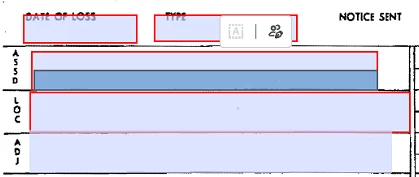


As you can see, the fillable form box is greyed out and does not let me type anything. I can fill the form if I click tab on my keyboard, also if I click "esign" or "certify document". But those are workarounds and not how Adobe works on other computers.


Can anyone please tell me how to turn off this setting and allow me to fill in forms without having to do the above workarounds? Thank you.


This topic has been closed for replies.

2 replies

Meenakshi Negi
Community Manager
Community Manager
May 2, 2024

Hi InfoRR,


Thank you for your patience so far.


The issue has been resolved. Please reboot the machine and then relaunch Acrobat.

Then, wait for some time and try to fill out the forms again. 


Let us know how it goes.


Thanks,

Meenakshi


Marking a reply or response “Correct” will help future users with the same issue quickly identify the correct answer.

Thom Parker
Community Expert
Community Expert
April 17, 2024
Thom Parker - Software Developer at PDFScriptingUse the Acrobat JavaScript Reference early and often
InfoRRAuthor
Participant
April 18, 2024

Thank you. However the thread was still unable to provide a solution that works.

Thom Parker
Community Expert
Community Expert
April 18, 2024

Did you turn off the new UI?


Thom Parker - Software Developer at PDFScriptingUse the Acrobat JavaScript Reference early and often