

New Participant
August 9, 2020
Question

Find text (NO whole words only) and Replace

  • August 9, 2020
  • 3 replies
  • 3471 views

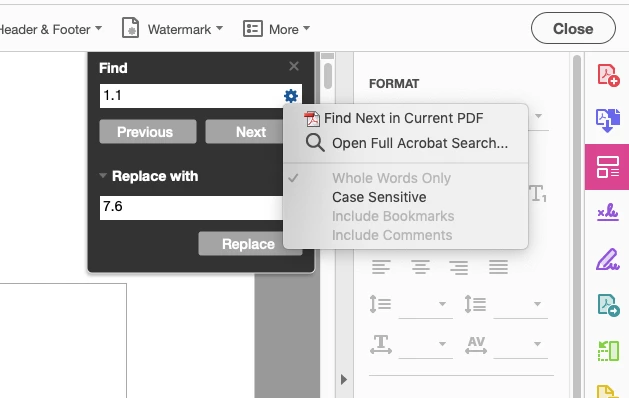
I need to find a text (NO whole words only) and replace it with another in Acrobat Pro. Is there any reason why the "whole words only" option is forcibly selected and grayed out?

 

3 replies

New Participant
March 19, 2024

I came across the same problem and accidentally found that I had to clear out the search and replace fields and close the edit PDF window. When I did a new search or search and replace, the Whole Words Only option was unselected.

ls_rbls
Community Expert
August 9, 2020

This may be achieved with javascript though.


Here's a Band-Aid remedy(not elegant, not perfect but useful):


for (var p = 0; p < this.numPages; p++)
{
var numWords = this.getPageNumWords(p);
for (var i=0; i<numWords; i++)
{
var ckWord = this.getPageNthWord(p, i, true);
if ( ckWord == "Acrobat")
{
var q = this.getPageNthWordQuads(p, i);
// Convert quads in default user space to rotated
// User space used by Links.
m = (new Matrix2D).fromRotated(this,p);
mInv = m.invert()
r = mInv.transform(q)
r=r.toString()
r = r.split(",");
l = addLink(p, [r[4], r[5], r[2], r[3]]);
l.borderColor = color.red;
l.borderWidth = 1;
l.setAction("this.getURL('http://www.example.com/')");
}
}
}


Note that the script above creates a red rectangle around the word(s) found. It also converts them to a hyperlink, but you  can modify the script to whatever way you need to behave.


This script example is referenced in the Adobe Acrobat SDK JavaScript API Reference,  "Doc methods",  Example 2, Page 232


This is an action than can be employed as a mouse-up action or as bacth using the Acrobat's built-in Action Wizard tool.


See slides:


You can reuse this action as many times as you need it. To perform a different search each time  just change the string of text inside the quotes in the line shown below:


if ( ckWord == "Acrobat")


Bernd Alheit
Community Expert
August 9, 2020

The OP want replace text in the document.

Bernd Alheit
Community Expert
August 9, 2020

It can only replace whole words.

KazVorpal
Participating Frequently
May 5, 2021
quote

It can only replace whole words.


By @Bernd Alheit

I want to point out how absolutely idiotic that is.

Good gods, do they really not comprehend that we are going to inevitably want to search and replace substrings?

Why even impose this kind of nonsensical restriction in the first place?

Bernd Alheit
Community Expert
May 5, 2021

You can ask Adobe.