


Participant
June 11, 2023
Question

Font does not display correctly

  • June 11, 2023
  • 1 reply
  • 1020 views

I am using Acrobat DC.


Since a week ago, some fonts have not been displaying correctly.


You may see what is the problem in the below figure.

I tested adjusting properties as below.
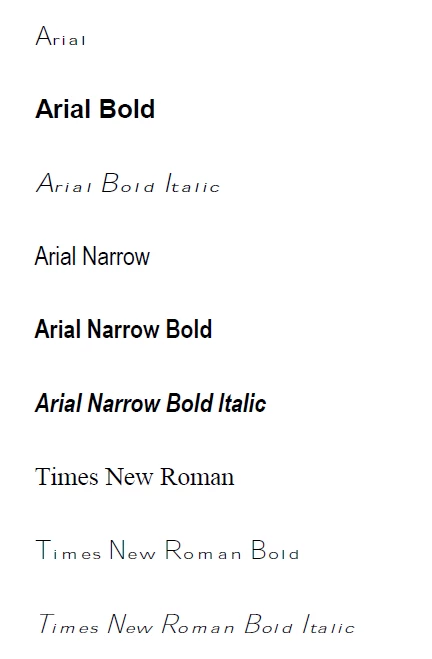


Weird thing is... the same file displays correctly in other's laptop.


I have searched to find who is suffering from the same problem, but I couldn't.


Anyone who knows how to solve this... please tell me.


Thank you in advance.

This topic has been closed for replies.

1 reply

Meenakshi Negi
Community Manager
Community Manager
June 12, 2023

Hi Jeonghun30428102fuy8,


Thank you for reaching out.


Could you please share more information about the issue here:

- Did you notice this on some particular PDFs?

- Are the fonts embedded in the PDF?

- Did you make any recent changes that may have caused this?

- Share the Acrobat and OS version numbers.


You may try repairing the application. Go to Help > Repair Installation.

If that does not help, reinstall the application using the following steps:
-Remove the application and run the cleaner tool (https://www.adobe.com/devnet-docs/acrobatetk/tools/Labs/cleaner.html).
-Reboot the machine
-Install Adobe Acrobat Reader from the following page: https://helpx.adobe.com/acrobat/kb/acrobat-dc-downloads.html. 


Let us know how it goes.


Thanks,

Meenakshi

Participant
June 13, 2023

Thank you for the answer, Meenakshi.


Here's the information you asked.

- Did you notice this on some particular PDFs?

  > So far, I have noticed this in the PDFs converted from MS Office programs (MS Word, Excel, Powerpoint)


- Are the fonts embedded in the PDF?

  > Honestly, I don't get what the embedded fonts are. As I wrote above, this problem is happening in the converted PDFs so far.


- Did you make any recent changes that may have caused this?

  > As far as I recognize, no I didn't change any options or settings in both Acrobat and MS Office programs.


- Share the Acrobat and OS version numbers.

  > Please see below. 

    a) Acrabat Pro DC (Version 2021.007.20091)

    b) Windows 10 Enterprise 64 bit (10.0, Build 19045)


I hope this will be helpful.


Thanks

Meenakshi Negi
Community Manager
Community Manager
June 13, 2023

Hi Jeonghun30428102fuy8,


Thank you for all the information.

We see that you are using an old version of the application. Please try updating the application to the latest version and check if you still experience the same behavior.

Would you mind sharing the original file and the PDF created? We would like to check it on our end.


Thanks,

Meenakshi