


erich45883979
New Participant
July 3, 2018
Answered

Font Issue in Acrobat Pro DC - Cannot find or create the font.......

  • July 3, 2018
  • 7 replies
  • 53300 views

I keep having an issue in Acrobat Pro DC.  I get an error message when trying to add text to a document.  Here is the error:

"Cannot find or create the font 'YZIWBC+ArialMT'.  Some characters may not display or print correctly."

I have seen this error in the Adobe Reader discussions but none of the solutions there are helping. 
This topic has been closed for replies.
Correct answer Adorobat

Shared Files - Acrobat.com

Here is the file.  I hope it came through. 


Thanks for sharing the file. I tried embedding the fonts in question  (.....+ArialMT) using Acrobat Pro DC's preflight tool using Tools > Preflight option > PDF fixups > fix potential font problems > analyze and fix and saved the file. When reopened, font error message was not there. Here is the link: Shared Files - Acrobat.com

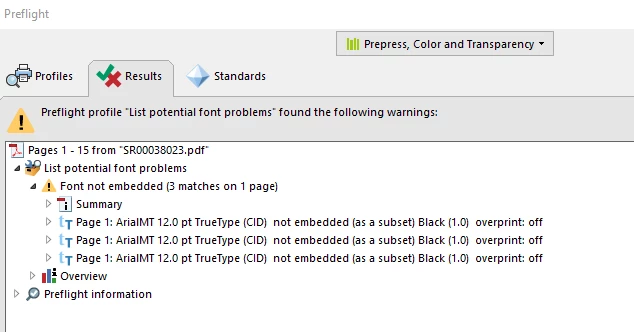
You can check the font issue in a pdf by running " list potential font problems" option under preflight. (below is the screenshot)

Let us know if you need any further help.

Shivam

7 replies

New Participant
October 19, 2021

I've had a huge amount of problems with fonts for months now.  It's been a nightmare.

When I try to edit, the font cannot be found.  Sometimes it's there, sometimes, it's not.  It does not use any available system fonts as enabled.  When I close an edit, then reopen, it corrupts some text to unrecoverable.  I think one of my fonts is being discontinued, but why not leave it for me to edit existing!!!!


I found this thread because of my frustration is especially high today.  Crashed and didn't autosave.  And in re-doing it all, the font issue has wreaked havoc!

My adobe DC is up to date.

New Participant
June 21, 2021

same issue here

New Participant
June 18, 2021

This is a dumb error I get on hundreds of files, please fix the problem. No way I have time to go back to each file and implement the corrections.

New Participant
May 6, 2021

I am running into the same problem.... I have outlined all the text but I am still getting the alert. What can it be? Please assist.

New Participant
November 25, 2020

This happens on my files repeatedly. Even with a complete new install and computer. It happens halfway through getting a book ready to send to be published and completely destroys the ability to work on the file. This solution shows how to "list potential font problems" and when I do that it lists every time I use the font I have in the doc, but there is no fix shown. Analyzing it doesn't fix the problem.

New Participant
February 10, 2021

Same problem here. 

Use local fonts / installing the fonts again, deinstalling and installing, all that has not helped. 

The PDFs can be opened by colleagues. This suggests that the PDF itself is correct. 

Problem suddenly appeared around summer 2020. There were no updates or new installations or anything like this prior. It came out of the blue. 

Like many of those who've described the same problem, I too have to open and close and edit numerous PDFs per hour. There really is no way I can go through so many workarounds for every single file. 

From everything I've tried, I too believe that there is an issue between Microsoft and Adobe. 

Helpdesk has not provided any solutions either. 

Has Adobe looked into this? 
It is very obvious that this problem concerns many users and so far, no solution seems to have been found.  

New Participant
July 9, 2020

I'm having issues with fonts in my pdf. I merged multiple 3rd party documents into one pdf and believe that some of the fonts are embedded. I ran the Preflight tool for "embed fonts" but recieved an error message "Cannot find or create the font "Symbol.Set.SWA092. Some characters may not display or print correctly".  I need to print this document for a binder set and it won't print, it crashes.  Please provide some advice as I'm on a tight timeframe to get this project finished. Thank you (Screenshots attached of Preflight Results).

roz.r
New Participant
July 16, 2020

I too am running into this same issue just a different font and yes it's loaded onto my computer.  Any further options to fix this as I too am in and out of PDFs changing things and this is really problematic.  thanks!

Adorobat
Community Manager
Community Manager
July 4, 2018

Hi Erich,

As per the issue description mentioned above, you are getting error when trying to add text on a pdf in Acrobat DC, is that correct?

Please check if the font mentioned above "YZIWBC+ArialMT" exists on the machine. 

You may also try the troubleshooting steps given in the following forum threads discussing the similar issue:

Cannot find or create the font 'arial unicode ms' error message

Cannot find or create the font 'Arial'.

Problem: "Cannot find or create the font 'Univers, Bold'.

Thank You,

Shivam

erich45883979
New Participant
July 5, 2018

NONE of these solutions helped.  Most of the solutions are pointed at older versions of Acrobat or Reader.  None have referenced Acrobat DC. 

For the first suggestion, my screen says it's using Arial as the font, Arial is installed on my computer.  So that is not the issue.  

But the error code comes up with a font that I do not have and is not displayed "YZIWBC+ArialMT".  I think the problem lies there.  I'm the account admin for my company and this issue is going to come up with my users.  I really think Adobe needs to take a serious look as to why this is happening. 

Adorobat
Community Manager
Community Manager
July 6, 2018

Hi Erich,

Would it be possible if you can share the pdf file you are working with to replicate the issue at our end?

To share the file here in the forums, refer to the steps given in this link: How to share a file using Adobe Document Cloud 

You may also share the link via private message. How Do I Send Private Message

Let us know if you need any help.

Shivam