


Form fields doubling...?
I have been having a hell of a time getting our forms put back together in Acrobat Pro DC. Besides the well known iOS issues, I now have some of our forms going out with double fields. For instance, I will have a plain text field named "Description_01" I will finish up the document, send it out to our techs, then when the document comes back printing is a nightmare because the text will be blurred around. I started looking into the problem and set a hard font size for that box, also set so that long lines will not scroll. That fixed many of the issues, but when you printed it, the text would appear bold. I went back into editing and found out that for some reason, some of my text fields had doubled. In edit, it looks normal, but if you click on the field and drag the box, there is another copy of the exact same field right below it. How does that even happen?
I 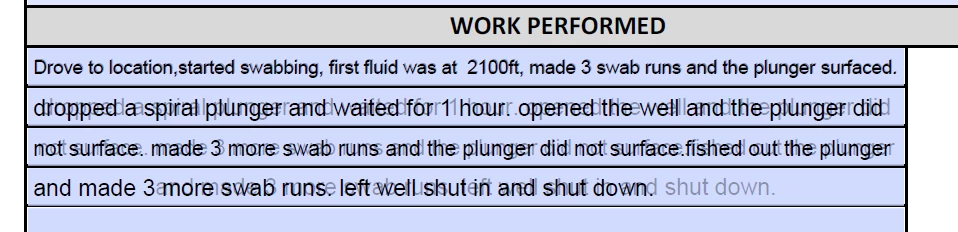
This was from a simple area of the form. This kind of stuff is coming in on a semi regular basis. There is a software hiccup somewhere.
 AdChoices