

Answered
Format Tab Missing
I'm trying to add calculations to my fillable PDF through the "prepare a form" tool but I'm missing the "Format Tab." Any help would be greatly appreciated! I'm running Acrobat Version 23.0 on my Macbook Pro.
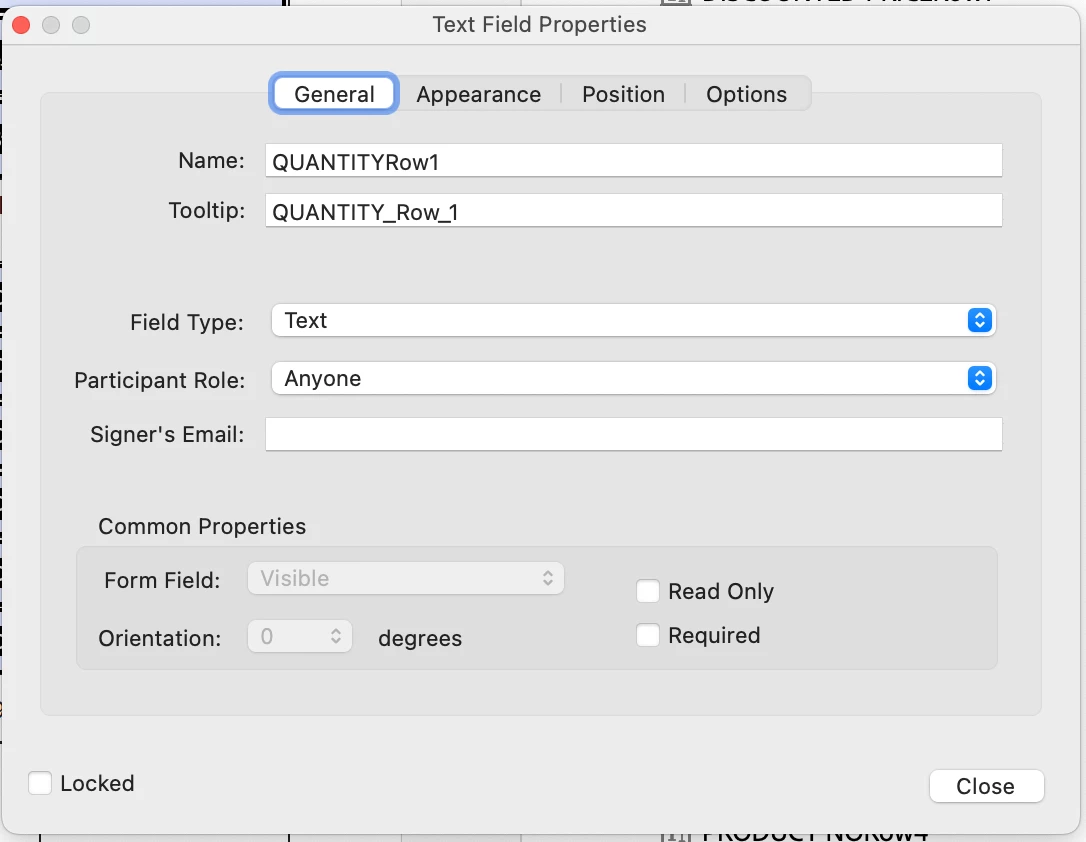

I'm trying to add calculations to my fillable PDF through the "prepare a form" tool but I'm missing the "Format Tab." Any help would be greatly appreciated! I'm running Acrobat Version 23.0 on my Macbook Pro.
Click on Tools - Prepare Form and then click on "More" at the right side of the window and then on "Revert to Acrobat Form". In the future, do not tick the box that says "This document requires signatures" when creating the form, as that converts the form to an Adobe Sign document.
Already have an account? Login
Enter your E-mail address. We'll send you an e-mail with instructions to reset your password.
 AdChoices