



Exit
  • Global community
    • Language:
      • Deutsch
      • English
      • Español
      • Français
      • Português
  • 日本語コミュニティ
  • 한국 커뮤니티
0

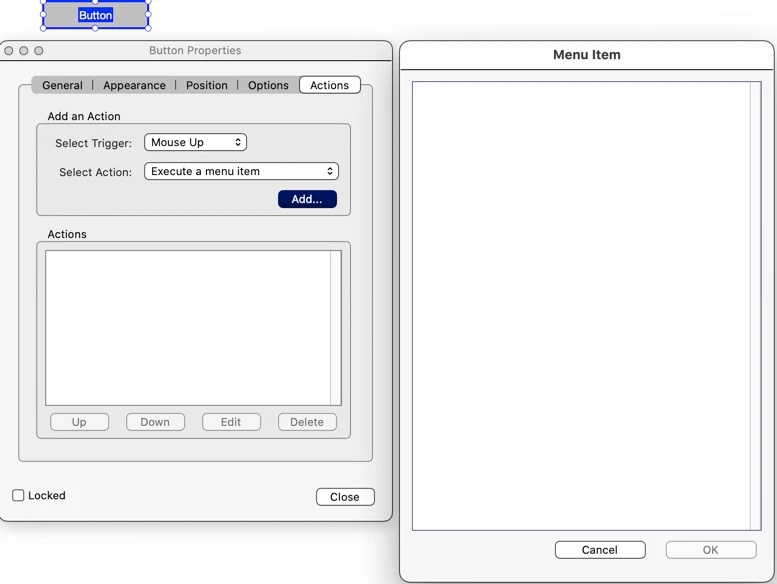
Forms - "Execute a Menu Option" selection screen is blank

Community Beginner ,
Nov 15, 2021 Nov 15, 2021

Has anyone seen this when working with forms on a Mac? It has been going on for a long time and through several updates. I haven't checked to see if it does it on my Windows VM, but I may have to so that I can use this feature.


Starting from a new, blank sheet:

  • Tools/Prepare Form/ add a button from the toolbar.
  • Right click on button object.
  • Properties/Actions/Execute a Menu Item/Add

"Menu Item" Window is blank.

I tried Adobe support. I had two people take over my computer and try to figure it outr. Frustratingly, I ran out of time. Whatever they were doing was very involved. They closed the ticket before I had time to get back to them.

Aside from Adobe support, I have tried clearing caches, and removing with the uninstaller and reinstalling.

Nothing helps. I really just want to know if it is just me, or if this is something others have experienced. I have found nothing on my web searches.
 

38AF9A90-F2E9-4D33-A85D-571E1A585960.jpeg

Acrobat Pro DC

Architecture: x86_64

Processor: Intel

Build: 21.7.20099.455081

AGM: 4.30.111

CoolType: 6.0.0

JP2K: 2.0.2.49666


MacOS

BigSur Version 11.6

Model Name: iMac

  Model Identifier: iMac19,1

  Processor Name: 8-Core Intel Core i9

  Processor Speed: 3.6 GHz

  Number of Processors: 1

  Total Number of Cores: 8

  L2 Cache (per Core): 256 KB

  L3 Cache: 16 MB

  Hyper-Threading Technology: Enabled

  Memory: 64 GB 2667 MHz DDR4

  Graphics: Radeon Pro 580X 8 GB

  System Firmware Version: 1554.140.20.0.0


TOPICS
General troubleshooting , PDF forms
1.3K
Translate
Report
Community guidelines
Be kind and respectful, give credit to the original source of content, and search for duplicates before posting. Learn more
community guidelines
Adobe Employee ,
Nov 16, 2021 Nov 16, 2021

Hi Garyc


Hope you are  doing well and sorry for the trouble. As described on executing a menu item from the Button in the PDF form a blank screen appears.


I have tried to reproduce the issue on my end using Win 10 OS and Adobe Acrobat version 21.07.20099 and its working fine.


Is this a behavior with a specific menu item or with all of them. Please share a small video recording of the same for a better understanding.


Also please try to reset the Acrobat preferences as described here- https://community.adobe.com/t5/acrobat-discussions/how-to-reset-acrobat-preference-settings-to-defau...


You may also try to create a new test user profile with full admin rights or enable the root account in MAC and try using the application there.


Regards

Amal

Translate
Report
Community guidelines
Be kind and respectful, give credit to the original source of content, and search for duplicates before posting. Learn more
community guidelines
Community Beginner ,
Nov 23, 2021 Nov 23, 2021

Didn't work. 

Translate
Report
Community guidelines
Be kind and respectful, give credit to the original source of content, and search for duplicates before posting. Learn more
community guidelines
Adobe Employee ,
Nov 24, 2021 Nov 24, 2021
LATEST

Hi Gary


Hope you are doing well and sorry to hear that .


Would you mind sharing the version of the MAC OS you are using? Also please collect the logs of the affected machine as described here https://helpx.adobe.com/creative-cloud/kb/cc-log-collector.html and share the logs via document cloud https://helpx.adobe.com/document-cloud/help/sharing-pdfs.html so that we can isolate the issue for the fix.


Also please share a small video recording of the issue for better understanding.


Regards

Amal

Translate
Report
Community guidelines
Be kind and respectful, give credit to the original source of content, and search for duplicates before posting. Learn more
community guidelines