


Participant
September 27, 2023
Question

Get rid of Pop-up "Get started/Learn more" in Acrobat

  • September 27, 2023
  • 7 replies
  • 4626 views

Hi,


I'm having an issue with this pop-up window on the screen every time I open PDF in Acrobat:
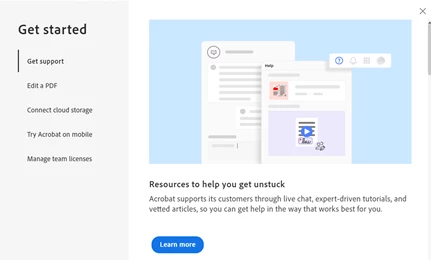
I've already unticked the Messages from Adobe in Preferences:

But it still doesn't work.


Did anyone come up with a solution?


Thanks!

This topic has been closed for replies.

7 replies

Participant
October 17, 2023

This is what I came here looking for. It is such a bother to see every time I open the app. PLEASE get rid of this annoying feature ASAP - I'm frankly at my wits end with these terrible updates.

Meenakshi Negi
Community Manager
Community Manager
October 20, 2023

Hi john5F9B,


The latest Adobe Acrobat version (23.06.20360) released addresses this issue. Please try updating the application to the newest version using the following steps as it is an optional update

- In Acrobat, go to Menu > Help
- Select "Check for Updates."


Let us know how it goes.


Thanks,

Meenakshi

Meenakshi Negi
Community Manager
Community Manager
October 17, 2023

Hi All,


The latest Adobe Acrobat version (23.06.20360) released today addresses this issue. Please update the application to the newest version using the following steps:

- In Acrobat, go to Menu > Help
- Select "Check for Updates."


For more information about the new release, refer to the following link: Adobe Acrobat Release Notes.


Let us know how it goes.


Thanks,
Meenakshi

Participant
October 2, 2023

This is also driving me completely insane, every time i open a new PDF! If I delete and re-install the app, it goes away, until Acrobat crashes randomly a few hours later, and then when I re-open it comes back. so I re-install, and re-input all of my preferences again, this is about 2x per day. slowing down my workflow significantly as I fight the pop-up every time I open a new file, which is about 1 every 2 minutes

Participant
October 3, 2023

I fixed this (without input from Adobe) by unchecking the box for use New Acrobat experience in preferences. Which rolls back to the prior UI, which to me is major benefit and I would have done it months ago had I known I could 🙂

Participant
October 3, 2023

Select the Menu and then select Disable new Acrobat or Acrobat Reader.


Participant
October 2, 2023

I also have this issue, this screen repeatedly pops up including when I am sharing documents on screen for presentations. I must have dismissed it 15x times today already. Can you please share the temporary workaround.

I assume a proper fix is coming too?

Participant
October 2, 2023

I'm having the same issue as well. What's the temporary solution?

Participant
October 2, 2023

I am having the same issue. And I second the request for a public response. Thank you.

Participant
October 2, 2023

Me too.  Third the request for a public response. Thank you.

Meenakshi Negi
Community Manager
Community Manager
September 28, 2023

Hi Kim32577594xlbg,


Thank you for reaching out, and sorry about the trouble caused.


I have shared some information with you in a private message in the community.

Please check your inbox and try the steps suggested. You may check the message via the envelope icon on this community window at the top right. 

Let us know if that helps.


Thanks,

Meenakshi

Participant
September 28, 2023

I dont understand why this couldnt be a puplic post? I'm having the same issue on my machine and its driving me crazy. Could you please share as I also unchecked show me messages and its still popping up.

Meenakshi Negi
Community Manager
Community Manager
September 29, 2023

Hi jasqid,


Please check your inbox, as we have shared the workaround.

This is a temporary workaround. Let us know if that works.

We will share the information with the team.


Thanks,

Meenakshi