


Participant
May 18, 2021
Question

Get stored data from variable to show up in a text field on a stamp.

  • May 18, 2021
  • 1 reply
  • 2744 views

I have a script that creates a dialog box and stores the users responses in variables.  I now need to get that stored information to display in a text field on a dyanimic stamp. I can get the information to the variables, but when I try and reference the variable in the text field, I get nothing. Any help is appreciated. All the coding is entered into the first text field (bBx01) in the Text Field Properties, Calculate, Custom calculation script:
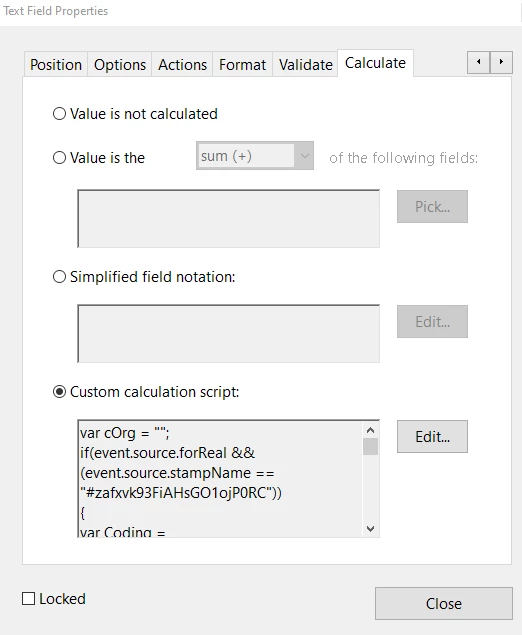
Attached is the script with example pictures.


This topic has been closed for replies.

1 reply

Thom Parker
Community Expert
Community Expert
May 18, 2021


Down where the dialog values are being printed to the console,  

Change the line 

console.println("Bx01:" + Coding.bBx01)


To:


this.getField("bBx01").value  =  Coding.bBx01;


Follow the same pattern for each line. i.e. Aquire the field object and set it's value to the corresponding dialog object member variable.


This code looks like it was created from the old AcroDialogs Plug-in. You must be using Acrobat 9 or earlier. 


You can find out everything you ever wanted to know about stamps here (and find thew AcroDialogs):

https://www.pdfscripting.com/public/All_About_PDF_Stamps.cfm


Thom Parker - Software Developer at PDFScriptingUse the Acrobat JavaScript Reference early and often
Participant
May 19, 2021

Thank you so much on my first issue. Another problem. I need to have the coding to allow this to run ONLY if this stamp name is chosen.  Where would I put that in all this coding. It keeps throwing an exception in the console whereever I think it should go.  Attached is the script for that area of coding. Why am I getting an Exception in line 185 of function top_level, script Field:Calculate.  Also, is there a way 'on Cancel' to have the stamp remove itself from the page instead of me selecting it and then deleting? I figured out how to make the fields show nothing on cancel.

Thom Parker
Community Expert
Community Expert
May 19, 2021

Line #1 contains the code for qualifying when the stamp code is run:


if(event.source.forReal && (event.source.stampName == "#Tg8BLUAxXrBBTqV2OQRX9A"))


As long as the stamp name is correct this if will only allow the code to run when the specified stamp is selected for placement. If the stamp name is wrong, the code won't run ever. 


There is no line #185 in the code you posted. In fact there are only 118 lines total. 


Given the two things you've mentioned, popup displaying more than once and the error on a line that doesn't exist in the posted code,  it sounds like it is some other stamp script is responsible. Are there any other dynamic stamps installed? 


Thom Parker - Software Developer at PDFScriptingUse the Acrobat JavaScript Reference early and often