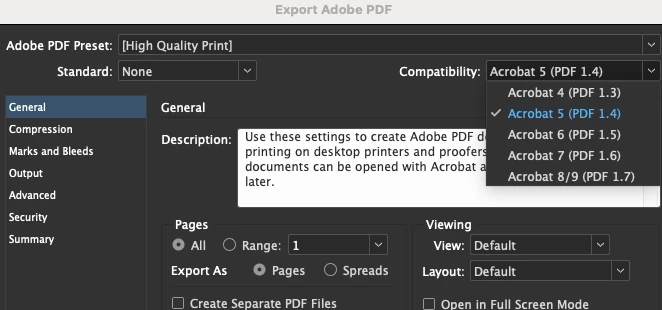
@jennyu56228975 @karenlewis @bridgetter54325219 Curious to know what the PDF compatibility settings are. Try exporting with a different compatibility setting. I normally have used the older settings. When I use to work in Pre-press (ad agencies, graphic designers, production houses, would bring their files, and we would make sure their files are good to go and make film negatives for commercial printers). And I was taught to use the older settings. The idea behind the latest Acrobat, newer PDFs may not work in older readers due to unsupported features. So, I have been using an older compatibility setting (e.g., Acrobat 5) for wider compatibility but limited features. It works for me. But, you could try Acrobat 6.0. Try that out.
@karenlewis @creative explorer @bridgetter54325219 @jennyu56228975,
Hi guys,
I was going through the thread and thought of writing down my comments here.
Different Acrobat versions have different compatibility levels for PDFs. For Instance, Acrobat 4 will not support transparency but Acrobat 5 onwards support that.
Again, layers are not supported on Acrobat 5 and below.
There may be a few key factors that show you different results for different files.
The following table compares some of the functionality in PDF files created using the different compatibility settings.
|
Acrobat 4.0 (PDF 1.3)
|
Acrobat 5.0 (PDF 1.4)
|
Acrobat 6.0 (PDF 1.5)
|
Acrobat 7.0 (PDF 1.6), and Acrobat 8 and
Acrobat 9 (PDF 1.7)
|
|
PDFs can be opened with Acrobat 3.0 and
Acrobat Reader 3.0 and later.
|
PDFs can be opened with Acrobat 3.0 and
Acrobat Reader 3.0 and later. However, features specific to later
versions are sometimes lost or not viewable.
|
Most PDFs can be opened with Acrobat 4.0
and Acrobat Reader 4.0 and later. However, features specific to
later versions are sometimes lost or not viewable.
|
Most PDFs can be opened with Acrobat 4.0
and Acrobat Reader 4.0 and later. However, features specific to
later versions are sometimes lost or not viewable.
|
|
Cannot contain artwork that uses live transparency effects.
Any transparency must be flattened before converting to PDF 1.3.
|
Supports the use of live transparency in
artwork. (The Acrobat Distiller feature flattens transparency.)
|
Supports the use of live transparency in
artwork. (The Acrobat Distiller feature flattens transparency.)
|
Supports the use of live transparency in
artwork. (The Acrobat Distiller feature flattens transparency.)
|
|
Layers are not supported.
|
Layers are not supported.
|
Preserves layers when creating PDFs from
applications that support the generation of layered PDF documents,
such as Illustrator CS and later or InDesign CS and later.
|
Preserves layers when creating PDFs from
applications that support the generation of layered PDF documents,
such as Illustrator CS and later or InDesign CS and later.
|
|
DeviceN color space with eight colorants
is supported.
|
DeviceN color space with eight colorants
is supported.
|
DeviceN color space with up to 31 colorants
is supported.
|
DeviceN color space with up to 31 colorants
is supported.
|
|
Multibyte fonts can be embedded. (Distiller
converts the fonts when embedding.)
|
Multibyte fonts can be embedded.
|
Multibyte fonts can be embedded.
|
Multibyte fonts can be embedded.
|
|
40‑bit RC4 security supported.
|
128‑bit RC4 security supported.
|
128‑bit RC4 security supported.
|
128‑bit RC4 and 128‑bit AES (Advanced Encryption Standard)
security supported.
|
I hope this table gives you a better understanding of why using the newer levels of compatibility would be better suited for viewing and working with PDFs.
-Souvik



 AdChoices