


New Participant
February 11, 2021
Question

Gray Text Box prints out

  • February 11, 2021
  • 1 reply
  • 1272 views

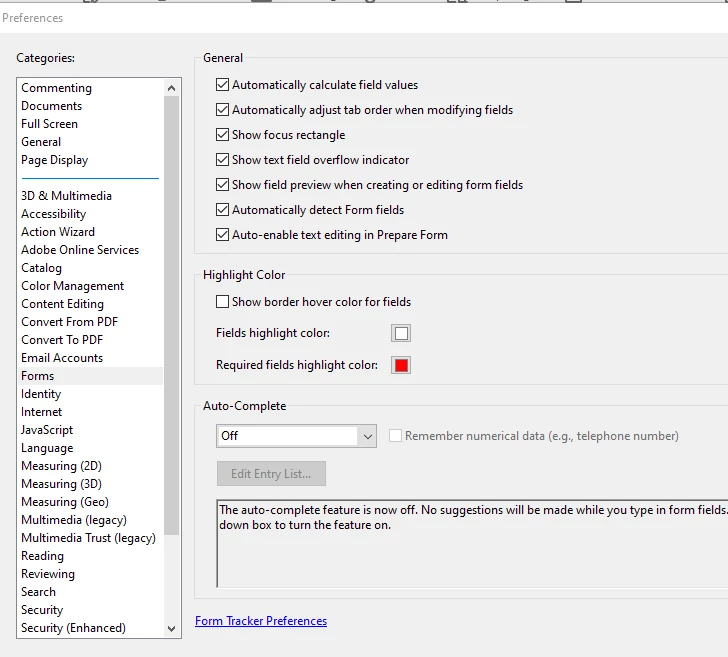
I created a fillable form and sometimes I am required to print it out and fax it.  When I print it out, the gray boxes print out, they aren't clear like someone mentioned in another forum thread.  I have gone under Preferences>Forms and the box show border hover is unchecked and I changed the fields Highlight color to white but it's still showing this gray.  How do I get these gone? I'm sure it's something simple but I'm using Adobe Acrobat Pro.  Thank you

This topic has been closed for replies.

1 reply

BarlaeDC
Adobe Expert
February 11, 2021

Hi,


Have you check the actual settings of the field?  Search tools for Edit Form, then select the field.


Malcolm

RickB1640Author
New Participant
February 11, 2021

I have the form open but I can't figure out where to go to edit the field.  I can't right click or anything and there isn't any option on the left hand side to click that I can edit the form box.  That's where I'm stuck at. 

BarlaeDC
Adobe Expert
February 11, 2021

Hi,


You need to search for "Edit Prepare Form" at that point you should see the fields as a black box with a name in the middle.


should look something like this [To be clear there are a number of edit options]

you want the second one on this list

Malcolm