Participant
November 22, 2017
Answered

Headers and Footers playing up - modifying my Paper numbers

  • November 22, 2017
  • 1 reply
  • 288 views

Hi there,

I seem to be having issues with using headers and footers on my Adobe Acrobat DC. I organised all my pages (removed all previous headers and footers). I select headers and footers in Adobe Acrobat (date, page numbers and Paper). The Paper section keeps playing up. Example: Agenda will be Paper 1.1, Minutes 1.2. I do this manually however the system ''gets confused'' and when I apply the next Paper number e.g. 2.1 it changes all previous Paper number to 2.1. I tried to remove all headers and footers, do a new pack etc. however the system keeps ''automacically changing'' the paper numbers to the number used on the previous page. Can you please advise on this?

many thanks
This topic has been closed for replies.
Correct answer Dave__M

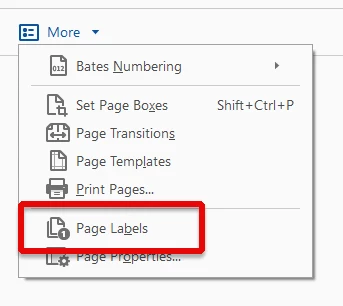
You may want to visit Acrobat's Page Numbering dialog to stratify your document into different numbering sections.  Click on the Organize Pages toolset, and click on the More... button.  Choose Page Labels.

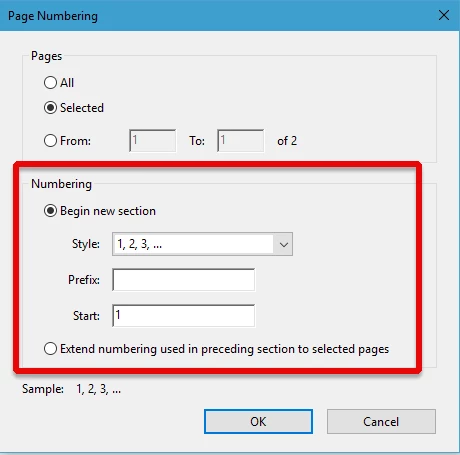
From the next dialog box, you can give various page ranges their own identity, and they'll then have their own unique numbering system.

I hope this info is helpful.

My best,

Dave

1 reply

Dave__M
Community Expert
Dave__MCommunity ExpertCorrect answer
Community Expert
November 22, 2017

You may want to visit Acrobat's Page Numbering dialog to stratify your document into different numbering sections.  Click on the Organize Pages toolset, and click on the More... button.  Choose Page Labels.

From the next dialog box, you can give various page ranges their own identity, and they'll then have their own unique numbering system.

I hope this info is helpful.

My best,

Dave