


Participant
May 5, 2025
Question

Help - No conrols or way to view files - just an arrow left

  • May 5, 2025
  • 1 reply
  • 388 views

Help! There is no way for me to biew any files that are opwned anymore. 

There is no menu bar, no controls, only an arrow and a tiny sliver of a box that if I click it wants to close pdfs.

pdfs say they are open but I can't view any of them.


Clicking the dots opens the Customise toolbar window, but o access to any other options at all.


See screenshot.
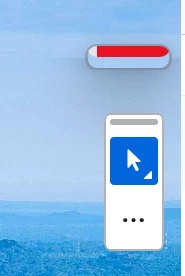
 

Running a laptop, Lenovo, windows, all new & work fine for every other piece of software except adobe.

1 reply

Participant
May 5, 2025

Typo: should read: There is no way for me to view any files that are opened anymore. 


This website won't work properly either . Not having a good adobe day

Amal.
Community Manager
Community Manager
May 5, 2025

Hi there


Hope you are doing well and thanks for reaching out.


Is this an issue with a particular PDF file or all the PDFs that you try to open?  What is the version of the Adobe Acrobat and the OS you are using? To check the version of the app, please take help from this article https://adobe.ly/4m0lXxd

Also make sure its updated to the latest version 25.01.2047X, Go to Help menu . Check for updates. You may also try to manually update the application using the link https://adobe.ly/42IhfMT and reboot the device once.


If it still doesn't work, please remove the application using the Acrobat cleaner tool https://adobe.ly/44jbZR9 , reboot the computer and reinstall the application using the direct link https://adobe.ly/44p6MaC;


Let us know how it goes.


Participant
May 5, 2025

Thanks Amal,

It's for every single file. Most of whih have been opened before with no issues.


This is an evolved problem that had been escalating over recent weeks, whenever I tried to view a pdf at less than the maximised window size, it would only display the toolbar and a small box with the maximise wondow button and an option to close all pdfs. No other controls at all.

Today it shrunk to only be what you can see in the screenshot.

I gave up and unistalled Adobe completely. It asked me to close all kinds of other aplications including Excel, Outlook which are not used by Adobe.

I am in the process of reinstalling it.

This is the vesrion I was running - see screenshot


Am on a Windows Lenova laptop, 3 months old. Have had zero problems with any other software.

Up to date latest Windows etc. Nothing wrong with the device it's on -- it's purely and Adbobe problem.


Kind regards