


Participating Frequently
August 20, 2021
Answered

Hidden data in acroform

  • August 20, 2021
  • 5 replies
  • 1436 views

Hi everyone


I have a very strange problem with a PDF form created with Acrobat. It's a simple acroform without any JavaScript. The form contains just a couple of text fields to enter a name, phone number, address, etc. I created the form, typed in some test data, resetted the form and sent it to people to fill it out. The form was obviously empty. But still, one of the recipients was able to see the mentioned test data I typed in before resetting the form!


I checked the internal PDF structure with Preflight and was not able to find the test data. But when I open the PDF with a simple text editor I actually find some of the test data I entered, although I resetted the form:
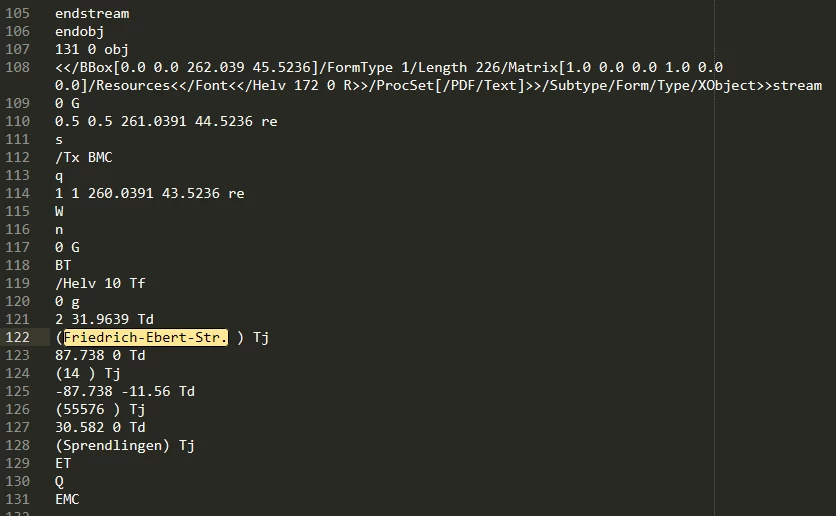


This raises several important questions:


  1. How is it possible that there is still “hidden data” in the form even though I resetted the form?
  2. Why/under what circumstances is an end user able to see this data?
  3. Most important: How do I make sure, that my forms do not contain this kind of hidden data?


Thx a lot for help!


Regards


Thorsten


This topic has been closed for replies.
Correct answer Test Screen Name

I started to remove all form fields and add them again one by one.... 


Extended Reader functionality seems to be somehow dangerous, since it is not reversible anymore. Is Extended Reader functionality still necessary today to save a filled in form?


Removing and re-adding the fields is NOT going to solve this problem. The "orphaned" info will remain if the signature is in place. You may be able to copy/paste fields into a new document.


I always advise to treat signing, reader enabling and setting security as irreversible, and to carefully backup first. I think Reader enabling is obsolete for most people today.

5 replies

Tom7320Author
Participating Frequently
August 21, 2021

Thanks to all the great people here for helping me understand the issue!!


The best advice is actually this one from "Test Screen Name":


"I always advise to treat signing, reader enabling and setting security as irreversible, and to carefully backup first. I think Reader enabling is obsolete for most people today."


Tom7320Author
Participating Frequently
August 21, 2021

There seems to be no way to remove this hidden information. Even Tools -> Protection -> Remove hidden information does not work. I still don't know why. But enabling extended reader functionality is my best guess....


Is there other 3rd party software that is able to remove this hidden data?


Thx a lot and have a nice weekend! 🙂


Braniac
August 21, 2021

I suggest you go back to the last backup before adding reader extensions, and proceed from there. 

Tom7320Author
Participating Frequently
August 21, 2021

I started to remove all form fields and add them again one by one.... 


Extended Reader functionality seems to be somehow dangerous, since it is not reversible anymore. Is Extended Reader functionality still necessary today to save a filled in form?


Tom7320Author
Participating Frequently
August 20, 2021

Thx a lot for your answers! But that is not enough. Unfortunately, the data is still there. I tried both ("Save as" and "Save optimized"). Still I am able to find the unwanted, hidden data...


Bernd Alheit
Braniac
August 20, 2021

Can you share the form?

Tom7320Author
Participating Frequently
August 20, 2021
Braniac
August 20, 2021

If you use SAVE all your changes are added only to the end of the file. Replaced info isn't accessible, but it is there in the file. If you don't want this, end your work with SAVE AS.

Luke Jennings3
Inspiring
August 20, 2021

This is just a guess, but try saving as an optimized PDF (File> Save as other> Optimized PDF). One of the settings may remove the unwanted info. If it works, you can create an Acrobat Action to easily apply it to a PDF or folder of PDFs.