


Participating Frequently
June 26, 2021
Answered

Highlight tool selecting entire page

  • June 26, 2021
  • 2 replies
  • 11658 views

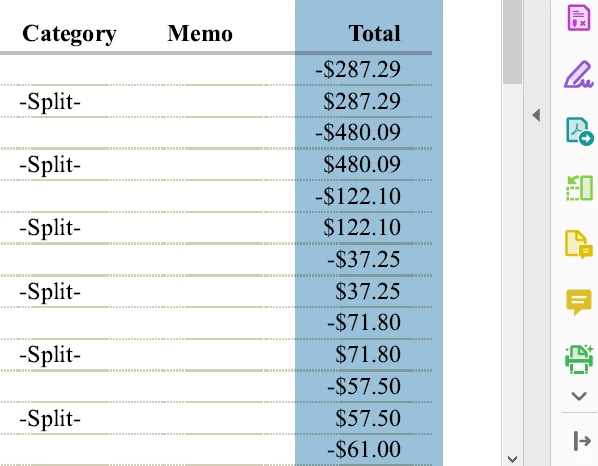
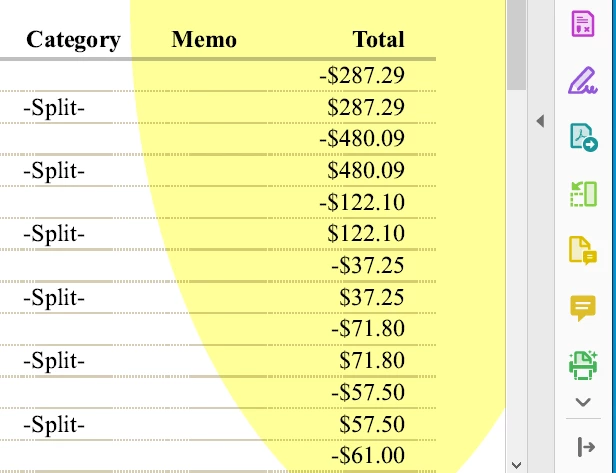
Suddenly, when I attempt to highlight one line of text, the tool is selecting an entire section of the page.  In the first pic, I am left-clicking to select the top number (-$287.29).  In the 2nd pic, I have released the left-click and this highlight appears.  Why can I no longer select one line of text?
Correct answer try67

Had to reprint the report because my redact tool is doing the same thing.

This is from a QuickBooks report that I printed to Adobe PDF.  Viewing it in Adobe Acrobat Pro DC (32-bit).


OK, it's just how the text in this file was created... You can try and fix it by exporting the pages as images, creating a new PDF file from those images and then running Text Recognition on it in Acrobat.

2 replies

New Participant
July 24, 2023

It is not helpful to be advised to recreate an entire PDF using images. This is a bug. When will it be fixed???

try67
Adobe Expert
July 24, 2023

Why do you think it's a bug in Acrobat and not in the file's structure?

try67
Adobe Expert
June 27, 2021

Can you share the file with us?

Libby98A5Author
Participating Frequently
June 27, 2021

What do you mean?  What file?


Thank you

New Participant
June 5, 2023

I am a bookkeeper.  I have been printing reports this way for years.  This only started a week or so ago.


Same Here. Need a fix not a workaround!