

Gripwik
Inspiring
September 17, 2021
Question

Horrible Compression in Combine to PDF

  • September 17, 2021
  • 2 replies
  • 1038 views

Having issues with terrible compression when I use the Combine files to single PDF. 

I set the options tro large file size
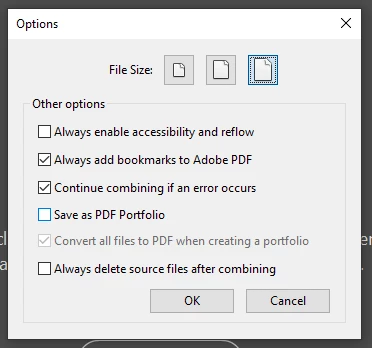
But this is always the result. 

This topic has been closed for replies.

2 replies

Inspiring
September 17, 2021

What is the source material? What is the resolution of the source image? Your approach is actually correct. However, because I don't know what you're doing specifically, it's hard to help. (If the source material is screen images, you won't get it printable in high resolution by converting it).

You could try the following workaround: First PDF the individual files, then merge these PDFs. Maybe you can then find a way to better control the quality while PDFing?

Gripwik
GripwikAuthor
Inspiring
September 17, 2021

Resolution of each image is lossless PNG. So it should be fine. Ive tried jpg too both net same results. 

Gripwik
GripwikAuthor
Inspiring
September 17, 2021

Here it is zoomed in so you can see the artifacts if you cant from the above pic.
