

Participant
July 7, 2016
Answered

How can I convert an outlook email with an attachment to a pdf

  • July 7, 2016
  • 5 replies
  • 3592 views

How can I convert an outlook email with an attachment to a pdf? I want one pdf with the email and attachment. Not a portfolio

Correct answer balam

Hi,

Please go to Adobe PDF option in the Outlook ribbon.Choose Change Conversion Settings and uncheck "Output Adobe PDF portfolio when creating a new PDF file" to create a normal PDF. Snapshot attached.
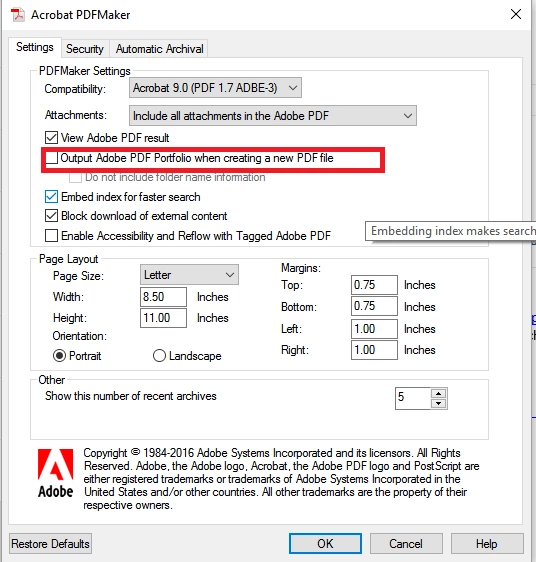
Regards,

Basma

5 replies

JR Boulay
Community Expert
Community Expert
June 25, 2025

[MOVED TO THE ACROBAT DISCUSSIONS]

Acrobate du PDF, InDesigner et Photoshopographe
Participant
June 25, 2025

In order to change an outlook email with attachment to PDF, it is important to use a effective PST email file converter like BLR PST Converter Tool. This tool enables you to convert single mails in the PST files into a PDF file along with its attachments. It preserves the same layout, the metadata and folder organization. The software offers fast conversion and high accuracy and is fit to make your Outlook emails in a more readable and more secured PDF form.

Participant
October 7, 2022

Export PST files into PDF file bulk with attachments into PDF file format. The PST to PDF Converter Tool is capable to convert PST files into PDF file format. The application gives a free demo version that users can convert some PST files into PDF file format. There are some steps to convert PST files into PDF file format:-

  • Download PST to PDF Converter Software
  • Start the application on your system.
  • Select PST files that want to convert into PDF file format
  • Preview your selected PST files before the conversion process.
  • Choose the location on your system where want to save your files.
  • Start converting PST files into PDF file format.

Read More:- https://www.osttopstapp.com/pst-to-pdf.html

Participant
August 27, 2022

WholeClear PST to PDF Conversion Application is an efficient tool to convert PST files into PDF files. With this software, users can easily convert their PST files into PDF file folders. Users can preserve their PDF data in there any location. The application is safe to convert PST data into PDF/HTML file folders without any data loss. There are options to convert PST emails, attachments, notes, tasks and etc. into PDF file folders. The tool is fully safe for converting PST data.

balam
Adobe Employee
balamCorrect answer
Adobe Employee
July 8, 2016

Hi,

Please go to Adobe PDF option in the Outlook ribbon.Choose Change Conversion Settings and uncheck "Output Adobe PDF portfolio when creating a new PDF file" to create a normal PDF. Snapshot attached.

Regards,

Basma

Participant
July 12, 2016

Why do I not have the Adobe PDF option for my Outlook ribbon?  I am using Adobe Acrobat 9 Pro (9.5.5) and Outlook 2013.  I need to convert 6000+ emails with attachments to a single PDF file and it is tremendously time consuming to do so without a way to convert the email and the attachment together.  

balam
Adobe Employee
Adobe Employee
July 13, 2016

Hi Wendy,

I am afraid Acrobat 9 doesnt support Office 2013. Office 2013 is supported with Acrobat 11.0.1 and later versions. Please refer Compatible web browsers and PDFMaker applications for Office and Acrobat compatibility information.

Regards,

Basma