


jasonh32191824
Participant
April 14, 2015
Answered

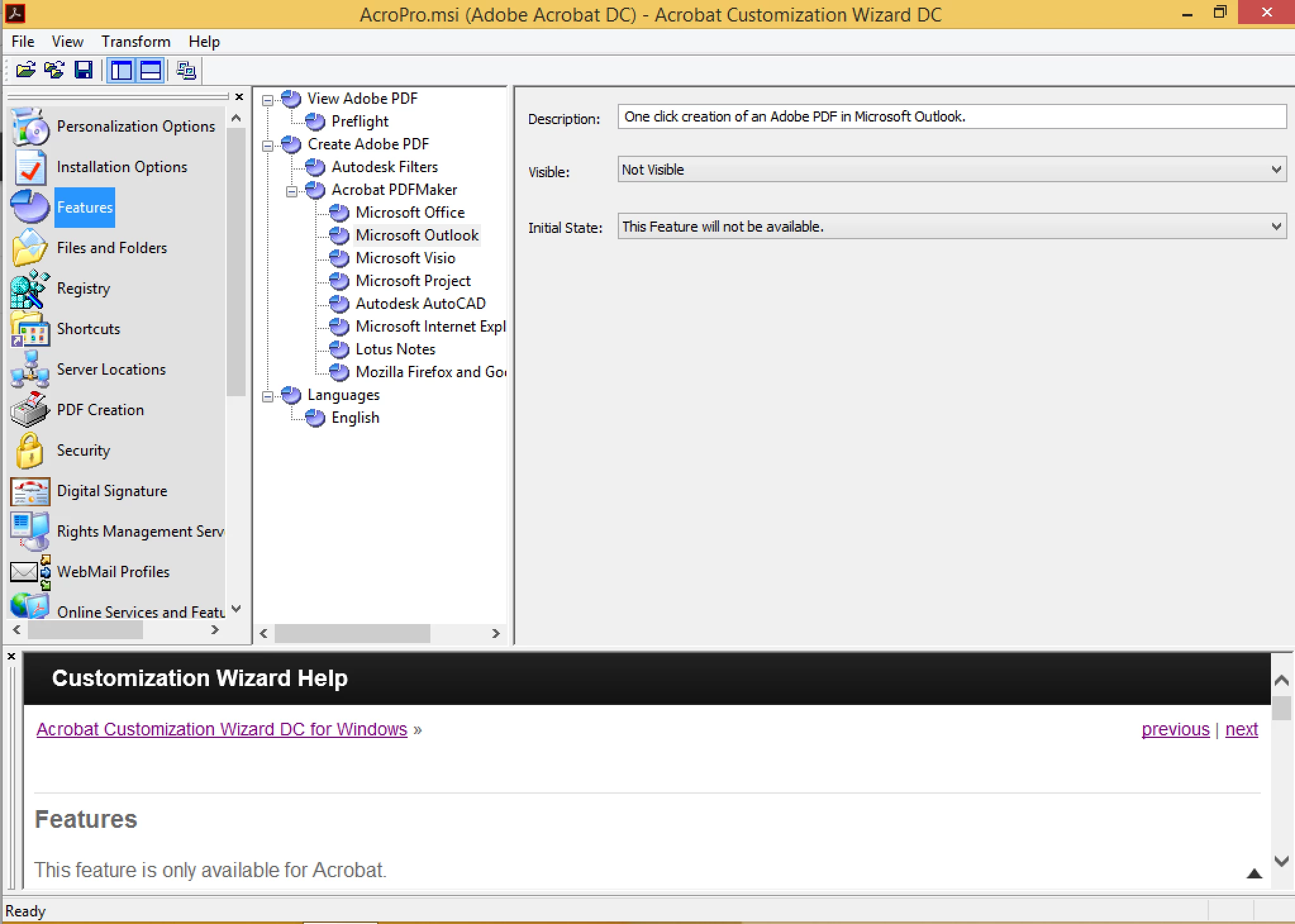
How can I disable the Outlook plugins that are installed with Acrobat DC using Acrobat Customization Wizard DC?

  • April 14, 2015
  • 7 replies
  • 85747 views

I cannot for the life of me find where the setting is to disable the Outlook plugins.  More specifically, we need to disable the send and track that shows up on the Outlook Home ribbon after install.
This topic has been closed for replies.
Correct answer Steve Cordero

In the Features panel.

7 replies

mediclinic software
Participant
June 22, 2022

ADOBE takes control and THEY SHOULD NOT  I prefer to Print HAND WRITE scan because it screws up my working life and all the open close remove takes longer than MANUAL systems SO WHAT THE POINT of this bloody software?


Also IP DETECT what a most moronic system  I TRAVEL for business and you stupid software like so many others designed by IDIOT programmers who think they know EVERYTHING whne thay cannot tell the weather unless they ask GOOGLE,  all detect I am in Notrthern China and translate everything or download for THAT region and I cannot speak that stupid language when the settings on my laptop or PC are ENGLISH  so why bother with regional settings on a PC or Laptop when some isot fool programmer tells me I CAN NOW speak Some foreign language?   CAN YOU FOOLS not design something that picks up the region settings on the device used as that would show if that person wants Chinese Russian Nth Korean or a martian language???

Participant
December 20, 2022

Hi Adobe,

Thanks for hosting the forum. I was  able to find my answer amongst all the jaded and self righteous halfwits that seem to think screaming at you and rambling on about their injustices is a given right that deserves any help at all. 


To everyone else reading this, cool your jets. Take a breath, it's just software. Sure it's got its problems, most things do these days. This is because too many people are raging lunatics and do not communicate well. Everyone wants to complain about someone else but not step in to make the difference. If you're so enlightened as to the cause of the problems and think you know a better system, funnel your roid raging red bull chugging mind into something productive and submit a proposal. Being "smart" is pointless if you don't apply it to improving that which you understand but others don't. If you cannot teach a better way, do not expect to find one yourself. Knowledge is only power when it is shared. Otherwise, it is just your opinion and you can keep those to yourself. With all the "brainiac" smartasses on this site I'm sure you could all put your XBox down for ten minutes and enlighten us to the obviously better way you have. Heck, you might even make a buck or two being a consultant. That is, if you're not completely full of crap and do not know anything but how to get high on the smell of your own farts. I think you have the troubles you do because of who you are and not because of some software issue. Deep inside you know you're too stupid to really show up in life and prefer to deflect your guilt onto people who are just working at a company. I mean, you do know that the people reading these things are far removed from the actual designers right? You do know the products are designed to tie up little minded people at lower levels while those who actually have intellect go on with their lives don't you. Have you not stopped to think about why every major software conglomerate has a myriad of "bugs" that make the PROGRAM not work? You are the program and they are running you just the way they need to in order to keep getting your money. If you were truly intelligent you would have found the other avenues that work and, surprise, surprise, they're free. The reason eleven versions of "improvements" have resulted in the way things are is that people like you are waiting with baited breath for someone else to engineer happiness and sell it to you. "You don't make money curing cancer, you make money treating it." If they gave you a program that worked, you wouldn't be waiting to see if the next one was any better and rush to the front of the line to get it. Hence why cell phones are twelve hundred dollar sheets of slippery glass. The "PROGRAM" is running just fine for what it is designed to do. 

Lastly, for being so smart, try using a spell checker or some patience when you type. Think about how you really look, even though you're just typing into a box. No one worth anything is going to do very much to fix something for a person like you. In fact, if I were them, I would intentionally fix everyone else's problems and make yours worse just to see you lose it some more. Now go get a hug from mommy, put on your big kid underwear and get a life.

edwins86104722
Participant
March 22, 2021

Worse of all, Adobe HIJACKS my attempt attaching a large document, and my emails get sent without the attachments at all, and some of these documents are very impotant legal documents with specific deadlines. The emails will be indicated as SENT but its up to me to notice the attacment I made was not inlcuded automatically. Missing those deadlines without the usual alert of "unable to sent email" has increased liability. Someone should sue Adobe for this.


annal37091157
Participant
November 7, 2016

thank you for your question.

Outlook does not open anymore and gets stuck in adding the add-ons after downloading.

HOw can I remove acrobate add-ons to outlook without opening Outlook?

I am just a normal enduser who has purchased a product that is making my life hard.

Participant
May 13, 2015

So where is the features panel?

bspence11
Participating Frequently
May 19, 2015

THANK YOU! I hate how Adobe changes everything in Acrobat after every release and doesn't make it obvious where the old features are.

tvuong
Participant
April 22, 2015

Yes. this is classic Adobe being clueless on how Enterprise deployments and standards work.  Seems whoever Adobe employs to write these things are like little kids running rampant without supervision.  These things they put in are not desired needs of anyone in a corporate environment as there is usually other processes and governance policies in place.  To implement these things without ease of turning things off is such lack of consideration on Adobe's part

Adobe Employee
April 15, 2015

Hi,

You can disable the 'Send and Track' plugin in outlook by setting the following registry key either through a policy or using the direct editor in Customization Wizard.

HKEY_LOCAL_MACHINE\SOFTWARE\Policies\Adobe\Adobe Acrobat\12.0\FeatureLockDown\cCloud\

bAdobeSendPluginToggle (1 --> enabled , 0 --> disabled)


DetailsWhen enabled, an Adobe Send and Track button appears in Outlook when composing an email. It enables sending large files as public links through Outlook. The attached files are uploaded to Adobe Document Cloud and public links to the files are inserted in the email body. Recipients can click the link to preview the file in a browser window and can download the file if needed. Possible values include:
  • 0: Disable Adobe Send and Track.
  • 1: Enable Adobe Send and Track.

Thanks,

Vinod

wallfly136
Participant
May 13, 2015

This entry does not exist in my registry, nor does any reference to 12.0\

I have 10, 11, DC, but nothing even closely resembling the entry below for those folders either. 

HKEY_LOCAL_MACHINE\SOFTWARE\Policies\Adobe\Adobe Acrobat\12.0\FeatureLockDown\cCloud\

bAdobeSendPluginToggle (1 --> enabled , 0 --> disabled)

wallfly136
Participant
May 13, 2015

FeatureLockdown Windows Registry entries are "ADDED" registry entries and they are added by the Administrator or person who creates the installer package.  These registry entries DO NOT EXIST by default in the Windows Registry .


Thanks, I sorted out how to remove these after the software is installed since nobody seems to be able to share how to remove it as an end user, post installation. 

Open Outlook,

Click File --> Options

Click Add-Ins

Where it says Manage: (at the bottom of the window), select COM Add-ins, then click Go...

Uncheck the options you don't want -  "Adobe Send & Track...."

As a side note, the add-on is HORRIBLE and causes Outlook to crawl or crash.  I'm running a 3ghz i7 quad with 8gb ram and it's crawling, that's how bad this add-on is. 

Steve CorderoCorrect answer
Adobe Employee
April 14, 2015

In the Features panel.

Participant
November 25, 2020

Whoever designed this feature at Adobe has a very inflated sense of the importance of Adobe's document cloud.  Really - every time I open an email I get a tooltip to add a Document Cloud link? Why not a Google Cloud link?  Why not a OneDrive link?  Why not a SharePoint link? Why not a Dropbox link?  Imagine if every one of those vendors did what Adobe did here and take over UI real estate. It's outrageous.