

Participant
November 4, 2025
Answered

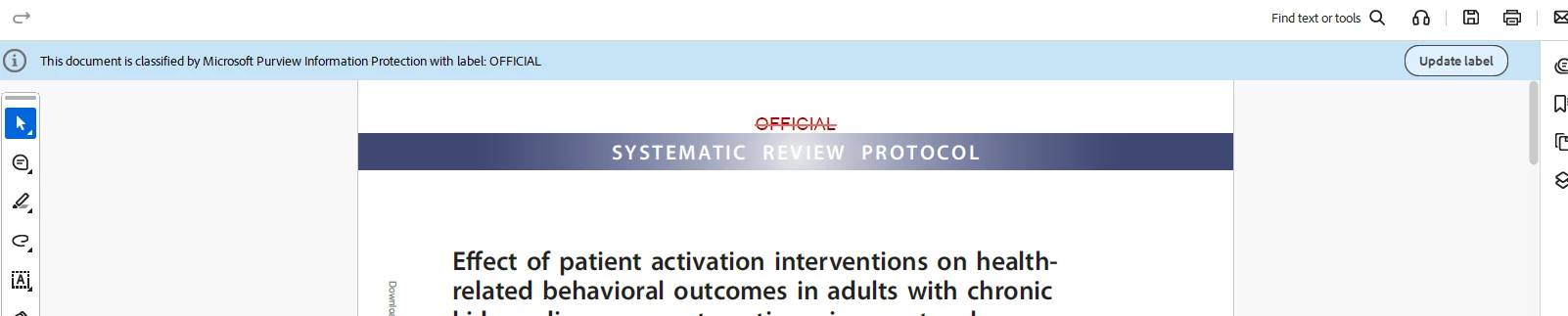
How can I remove a sensitivity label that my organisation puts on all my pdfs
  • November 4, 2025
  • 2 replies
  • 266 views


Correct answer funny_problem1347

Apparently this label cannot be removed as my organisation has made this mandatory and there is no way to select remove label, this is what my company IT has now informed me.

2 replies

Participant
November 5, 2025
quote


By @funny_problem1347

Removing a mandatory sensitivity label from PDFs, likely enforced by solutions like Microsoft Purview (AIP), depends on whether the file is E-ZPass New York merely marked or actually encrypted. If the file is only marked, the simplest solution is to open the original source document (Word/Excel), change the sensitivity label to "Unlabeled" or "Public," and then re-save the PDF. If the file is encrypted, the safest way to bypass the protection is to Print the secured PDF to a new PDF file using a virtual printer like "Microsoft Print to PDF"; this creates an unencrypted, image-based copy, effectively stripping the label and any visual markings.

funny_problem1347AuthorCorrect answer
Participant
November 11, 2025

Apparently this label cannot be removed as my organisation has made this mandatory and there is no way to select remove label, this is what my company IT has now informed me.

creative explorer
Community Expert
Community Expert
November 4, 2025

@funny_problem1347 The quickest way to attempt label removal is by using the dedicated button in the Acrobat interface. Open the PDF in Adobe Acrobat, look for the blue information bar at the top that displays the sensitivity classification, and click the "Update label" button on the far right. This action will open a dialog box listing the available options; look for and select "Delete label", then click Update or Apply to finalize the removal.

m
Amal.
Community Manager
Community Manager
November 4, 2025

Hi there 


++ Adding to the discussion 


Please go through the steps shared in the help page https://adobe.ly/4oqxzKK and see if that works.


~Amal
