


Inspiring
March 21, 2019
Answered

How can I stop overlapping textboxs when I add new line on Adobe Acrobat?

  • March 21, 2019
  • 3 replies
  • 14899 views

I am trying to edit my PDF book with Adobe Acrobat. When I add the new line to the textbox, my current textbox is overlapping with next textbox instead of making the next textbox shifting down. Here is an example that explains my situation:
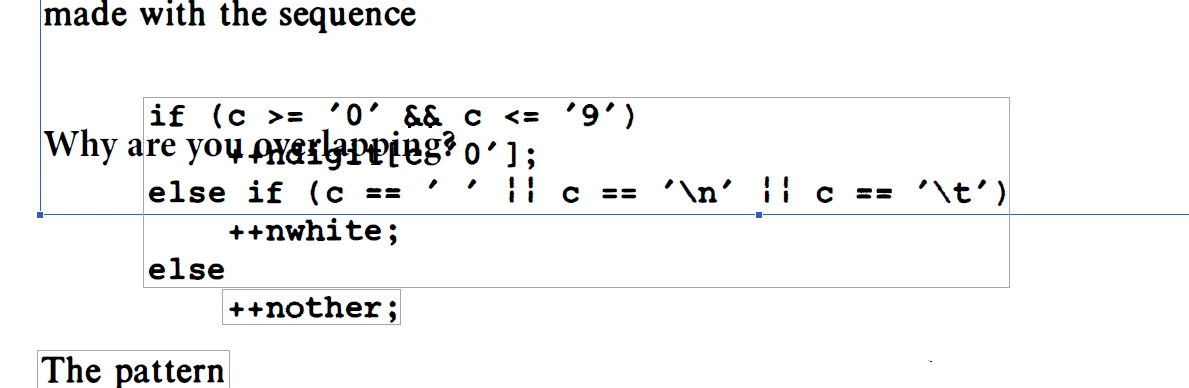
How can I fix that?

This topic has been closed for replies.
Correct answer my-lord

My current workaround is increasing the sizes of pages. Increasing the size of pages from Tools>Set Page Boxes seems useful workaround for me. This allows me to shift the text boxes of the page down. So I can add my text easily.

Screencast 2019-03-25 17:31:02 - Streamable

3 replies

my-lordAuthorCorrect answer
Inspiring
March 25, 2019

My current workaround is increasing the sizes of pages. Increasing the size of pages from Tools>Set Page Boxes seems useful workaround for me. This allows me to shift the text boxes of the page down. So I can add my text easily.

Screencast 2019-03-25 17:31:02 - Streamable

Karl Heinz  Kremer
Community Expert
Community Expert
March 21, 2019

These "boxes" are Acrobat's way of trying to organize text. In a PDF file, you do not have a concept of paragraphs or headers or any other organizational mechanism our brain uses to make sense of set of a page. Sometimes Acrobat gets it wrong, and then unfortunately, there is nothing (or not much, see below) you can do about that. In general, if your document was created using Adobe Acrobat from e.g. an office application, these boxes behave more the way we would expect them. If you are using a PDF generator that makes it harder for Acrobat to organize text, then you end up with a lot of head scratching.

As Bernd suggested, the best way to edit a PDF file is always to not have to edit it at all: Make all your edits in the original application and then create a new PDF file. If that is not possible, sometimes you end up with better results if you try to export the PDF file as a Word document and then edit in Word. Another option might be to completely remove the section in question from your PDF file and copy and paste formatted text from a Word document into your PDF file.

my-lordAuthor
Inspiring
March 21, 2019

Thanks for the suggestion. But when I try to export.pdf files to word, a lot of data loss and font loss occur which affects my quality of the document. Any other PDF editing advice will be appreciated.

Bernd Alheit
Community Expert
Community Expert
March 22, 2019

How did you create the first version of your book?

Bernd Alheit
Community Expert
Community Expert
March 21, 2019

Edit the original document and create a new PDF file.

my-lordAuthor
Inspiring
March 21, 2019

What do you mean by "original document". Is it the document that book is created and converted to the PDF format?