Participant
September 21, 2025
Answered

How can i turn png to pdf without compression?

  • September 21, 2025
  • 2 replies
  • 329 views

I have multiple png that I want to merge into one pdf file. and i want it without any compression.

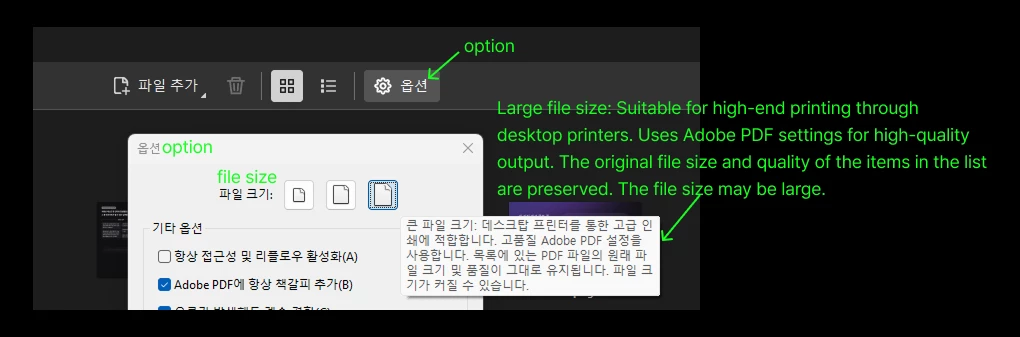
I tried the option menu which you can see on the screenshot, but it still compress pretty much a lot. 

Is there any way to keep the png quality? 
Correct answer JR Boulay

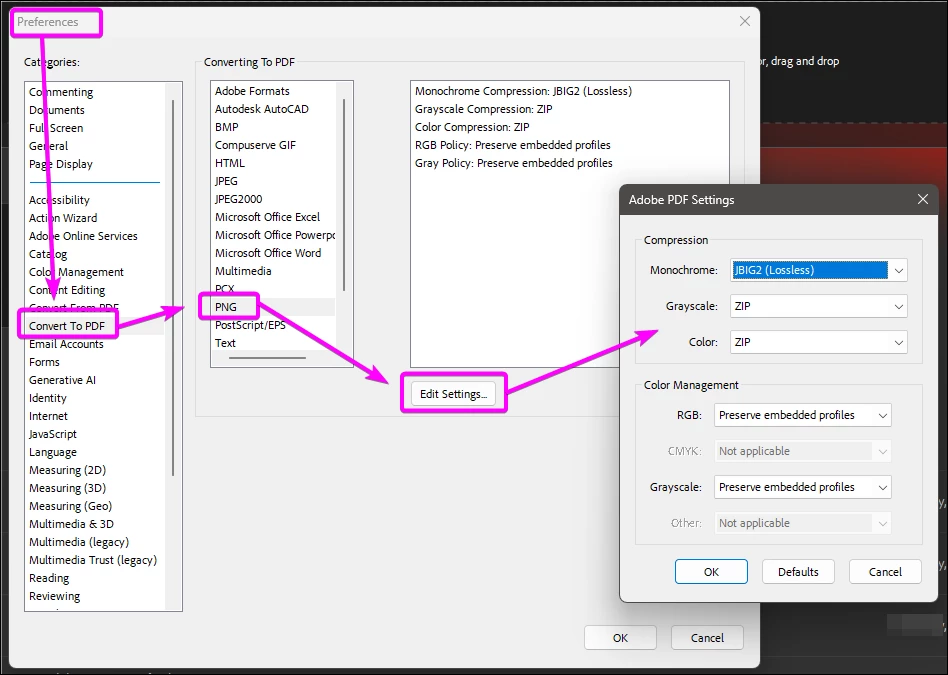
PNG conversion can be done using lossless compression (ZIP, JBIG, JPEG2000).
An uncompressed PNG file only takes up extra space.
The conversion settings can be adjusted in Preferences:


2 replies

JR Boulay
Community Expert
JR BoulayCommunity ExpertCorrect answer
Community Expert
September 21, 2025

PNG conversion can be done using lossless compression (ZIP, JBIG, JPEG2000).
An uncompressed PNG file only takes up extra space.
The conversion settings can be adjusted in Preferences:


Acrobate du PDF, InDesigner et Photoshopographe
gary_sc
Community Expert
Community Expert
September 21, 2025

Hi, @good_hands4338, what kind of pngs are these? -8 or -24?


PNG-8 has 256 hues, shades, and luminosity; total. That's it, just like any GIF.


PNG-24 is like a JPG image (8x8x8 bits of information) but is not lossy.


Are these PNG images of text or of images? Can you share a sample image?


Thank you,