


Dmitriy K.
Known Participant
July 22, 2020
Answered

How delete blocked SHX comments

  • July 22, 2020
  • 2 replies
  • 11002 views

How can I delete blocked SHX comments? File saved from AutoCAD
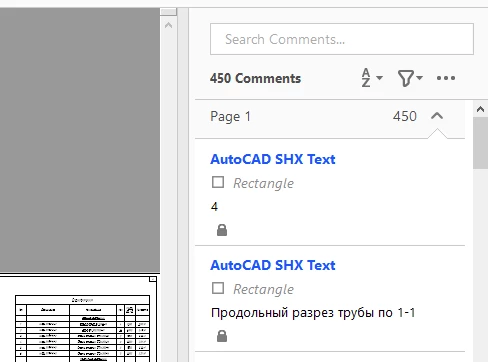
This topic has been closed for replies.
Correct answer try67

Many thanks! I downloaded and installed the script for you, it works. But unfortunately, very slowly, even in the example file, with a small number of blocked comments, 450 comments in 4 minutes. Usually, I need to delete 6000-7000 thousand comments.


I'm implemented some changes that should help it go faster. Download it from the same location and try it again.

2 replies

New Participant
September 14, 2023

What method to delete this shx

try67
Adobe Expert
July 22, 2020

You have to unlock them first. Right-click it, select Properties and untick the Locked check-box.

Dmitriy K.
Known Participant
July 23, 2020

Thank you for taking the time to my questions, but the problem is that the Comment is not blocked. The checkbox is empty in the properties, I conclude that AutoCAD does this when converting to PDF.

Dmitriy K.
Known Participant
July 24, 2020

It's not possible to know which comments are displayed and which are not, no. It is possible to manually filter them in the script itself, based on various criteria.


Happened!

for (var i=annots.length-1; i>=0; i--) {
annots[i].setProps({readOnly: false, lock: false});
if (annots[i].author == "AutoCAD SHX Text")
annots[i].destroy();
}

Once again, thanks a lot!
