



Document Geek
Community Expert
Community Expert
June 18, 2019
Question

How did my Acrobat get updated when I have automatic updated turned off?

  • June 18, 2019
  • 1 reply
  • 2044 views

After a bad experience with Auto-updating last fall, I wrote an article about it: Document Geek: How to Get the Old Version of Acrobat back

I followed my own advice and turned OFF auto updates.
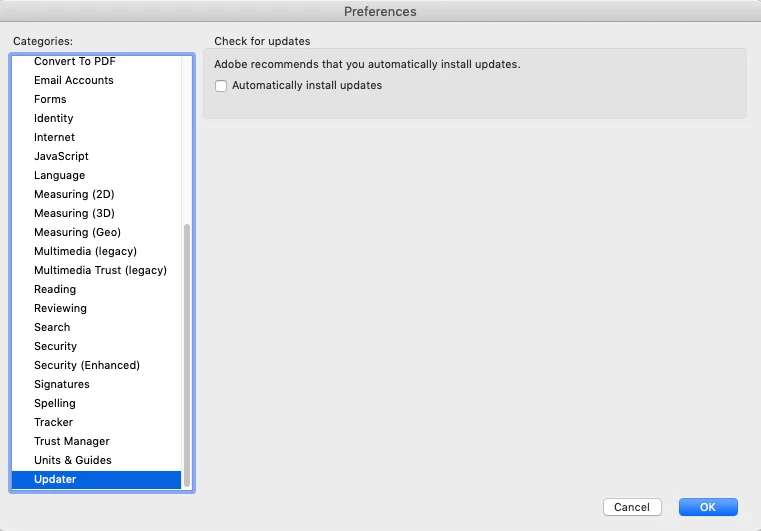
But now I have version 2019.012.20034, which is one below the latest version: Release Notes | Adobe Acrobat, Reader
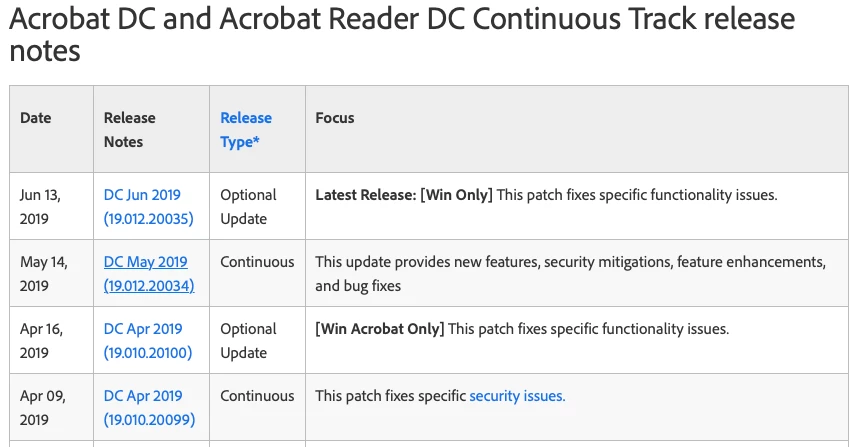
Am I correct in assuming that turning OFF auto updates only turn off the Optional updates, and not the continuous updates?

This topic has been closed for replies.

1 reply

Meenakshi Negi
Community Manager
Community Manager
July 3, 2019

Hi DocumentGeek,

Sorry for the delay in response.

Yes, you are correct. Turning off the auto updates under preferences only turns off the optional updates. The continuous updates will keep on updating in the application.

If you wish to disable the updates, you can use the Acrobat customization wizard Welcome to the Wizard — Acrobat Customization Wizard DC for Windows or the Windows registry Windows Updates

Please refer to the steps provided in the following forum thread with the simialr query How to disable automatic update of Adobe Acrobat 2017 Pro?

Hope that helps.

Regards,

Meenakshi

Document Geek
Community Expert
Community Expert
July 4, 2019

I am on a Mac. Is there any way to turn off the auto updates on a Mac?