New Participant
September 2, 2020
Answered

How do I change the TO email address when Submitting a form ?
  • September 2, 2020
  • 2 replies
  • 3905 views

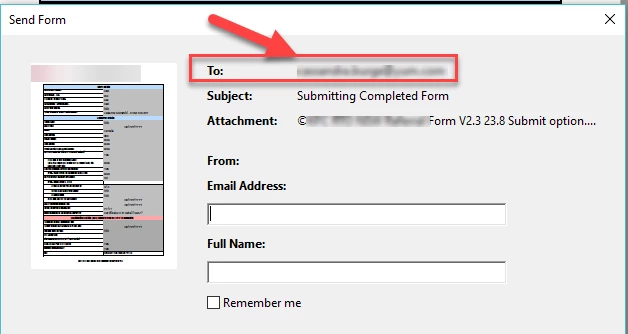
Hi There, I have taken over a form and need to change the TO email address so that when the learner fills it out and clicks "submit form" it goes to a different email address that is currently displaying"

I canst see to find this email address stored anywhere.

When I go to preferenced - identity- I can change the email address there but that changes the From email address, not the TO.

Any help would be greatly appreciated.

PS - I am not an expert 😞  


Correct answer Document Geek

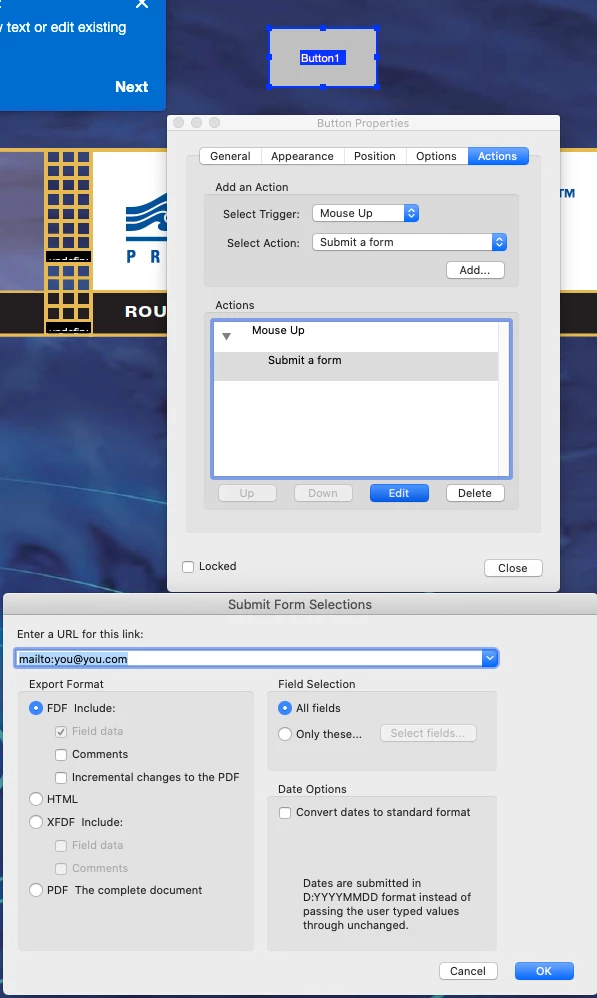
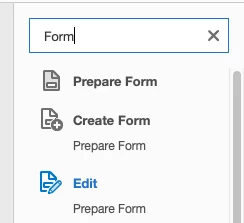
You'll need to edit the form. 

Then double click on the Submit form button. Then edit the email addres associated with the button. 

2 replies

New Participant
March 20, 2025

I would like to change this as well. The email in the "To" line is my boss, even though I am using my own adobe account. The fix on here does not address this issue at all.

try67
Community Expert
March 20, 2025

Are you saying you want to change the address from which the email is sent? That is the "from" field, not "to", and it can't be changed in the properties of the button. You can change it by setting up a different email account in the application, though, via Menu - Preferences - Email Accounts.

New Participant
March 20, 2025

Just as the OP highlights in the attached pic, I need to change the "TO:" in the dialog box that pops up when the SUBMIT FORM button is pressed.. My boss had previously logged in to her adobe account on the laptop that I now use.  I Now have my own adobe account with its own log in credentials, however, the "TO:" line in dialog box that pops up still populates my boss' email address. I added my own credentials in the MENU>PREFERENCES>EMAIL ACCOUNTS, added my outlook info, made it the default, but it still shows my boss' email. Neither of us can figure it out.

Document Geek
Document GeekCorrect answer
Community Expert
September 2, 2020

You'll need to edit the form. 

Then double click on the Submit form button. Then edit the email addres associated with the button. 

New Participant
September 3, 2020

Hi There,


Thanks so much for the details and screenshots. Super helpful but I don't seem to have the "Actions" tab that you have on your screenshot.

Any other ideas on how I can change this?


Document Geek
Community Expert
September 3, 2020

What version of Acrobat are you using?