


Copy link to clipboard
Copied
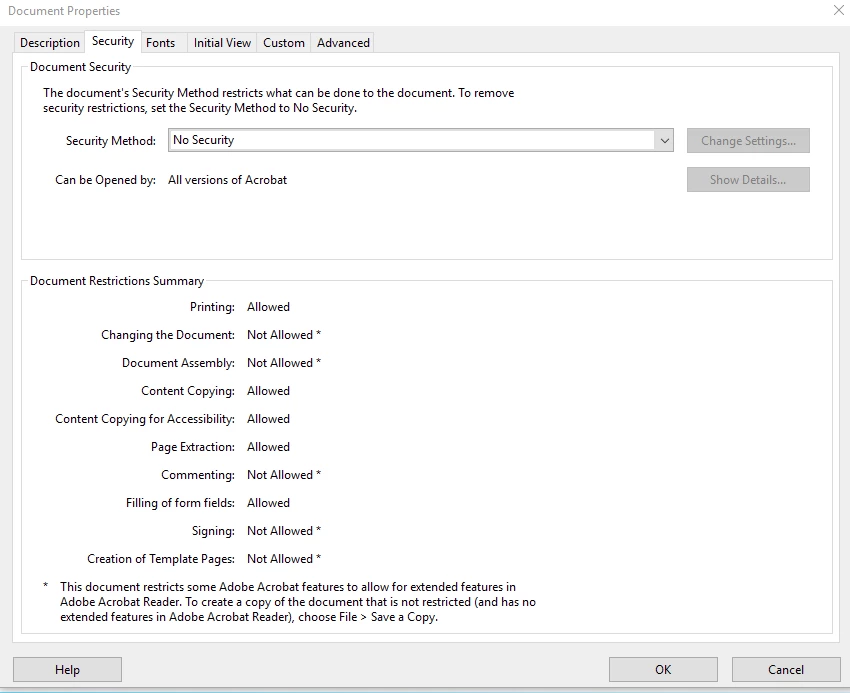
I working on something that needs these explicit document restrictions. More specifically, how do I save extended features to toggle on/off certain document restrictions - to have signing enabled or not, commenting allowed or not, etc.?
With current adobe DC pro, I have only two "Save as Other" => reader extended pdf settings, which result in a combination different from the attached image.
Copy link to clipboard
Copied
Back in the old days, these Reader Rights, or Reader Extensions could only be applied with the Adobe Rights server, which was very expensive. Us developers just ignored anything that required rights to operate. Then Adobe started giving away some of these rights for free in Acrobat 7, and each version since then has added more. There are many more rights/restrictions than shown on the document properties, and there is much finer granularity as well. If you want access to these you'll need to talk to Adobe about licensing the (very expensive) tools for doing this.
Copy link to clipboard
Copied
Back in the old days, these Reader Rights, or Reader Extensions could only be applied with the Adobe Rights server, which was very expensive. Us developers just ignored anything that required rights to operate. Then Adobe started giving away some of these rights for free in Acrobat 7, and each version since then has added more. There are many more rights/restrictions than shown on the document properties, and there is much finer granularity as well. If you want access to these you'll need to talk to Adobe about licensing the (very expensive) tools for doing this.
Copy link to clipboard
Copied
Is the document an XFA form created in LiveCycle Designer?
Get ready! An upgraded Adobe Community experience is coming in January.
Learn more