


Correct answer JR Boulay

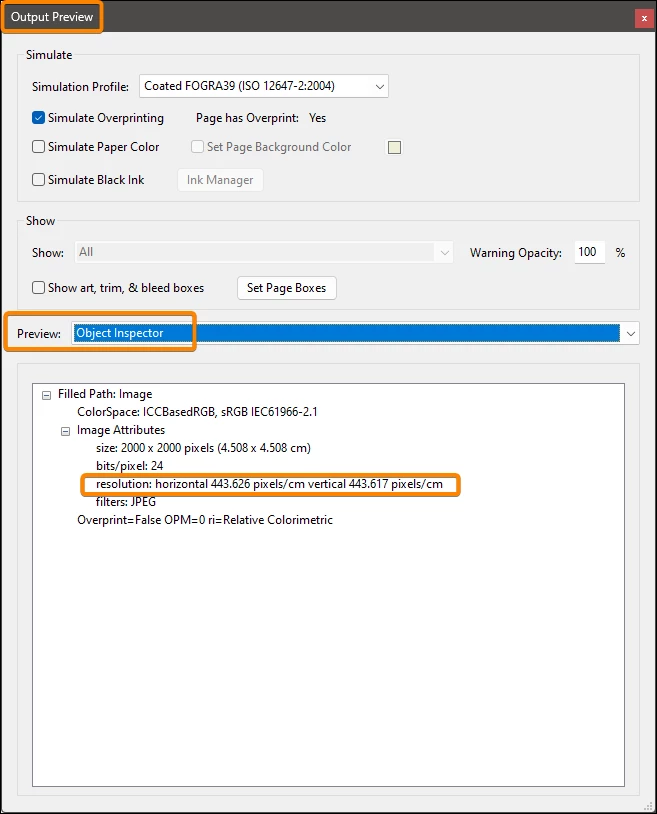
To know the resolution of an image open the Print Production tools: Output Preview, Select the Object Inpector an clic on any image.
 

5 replies

danb37112406
Participant
October 2, 2025

Why wouldnt Adobe have an EASY TO FIND option to view a file's color profile and resolution? Its not as though these are esoteric questions people have when they are working with a PDF. Ridiculous. Acrobat has been "improved" over the years to be more and more frustrating. I really hate the app at this point and would use other options if it wasnt still industry standard.


Dave Creamer of IDEAS
Community Expert
Community Expert
October 2, 2025

A PDF can be a mixture of resolutions or none at all (if all vector), and a mixture of color profiles depending on how the PDF was generated. So, there would be no clear answer.

A majority of the users are business users with no need to have that info handy. If one is in the prepress industry, one _probably_ knows how to find out or asks someone who does know.


David Creamer: Community Expert (ACI and ACE 1995-2023)
danb37112406
Participant
October 2, 2025

Ridiculous. There IS a resolution for a PDF when generated . Of course various elements within the PDF may be placed with different resolutions – but the general PDF is created at a specified resolution(as seen in the PDF spec window when one creates a PDF). Having been in the graphics world for 25+ years, I know this is a common question not only of designers, but when someone at a print shop receives such a file. After working with Adobe customer service for 30mins, there IS a place where this data is available – unfortuantely it is burried and unclearly labeled with Acrobat tools. Seems document resolution, document size and color profile are VERY basic points for any PDF print file. The question is: why not have a SIMPLE and clear option for this data? Its silly.

For anyone else who has torn their hair out trying to obtain the info, it can be found: Tools: Use Print Production: Output Preview – go to the "Preview" dropdown and select: Object Inspector: then (without direction on what to do next) note that your cursor has changed to a crosshairs – select the section you want to get the resolution for and (if its a photo) it will give it.

Participant
April 18, 2025
You can use the preflight tool to check the DPI (dots per inch) and scan all the images. However, you’ll need to set up a custom profile. Go to the preflight tool, create a new profile, set it to check images below a certain DPI, and then run the analysis.


Participant
May 28, 2024

I print lots of labels for my small business. Up until recently, when I got my file ready to print, I was able to select "print on both sides" and select ADVANCED settings to change the dpi from 600 to 1200.


Tonight, I was NOT able to see the "print on both sides" NOR see any advanced settings that include the dpi changes.


I have a Canon MF753CDW printer and have had no issues til now. Not sure what could be causing the issue.


I've removed and re-installed the printer. I've cleaned the printheads according to manufacturer recommendations. I have been printing labels since September in the EXACT Same manner with no issues til now.


Not sure if it's an update in Windows, Adobe, or Canon.


Any thoughts?

JR Boulay
Community Expert
JR BoulayCommunity ExpertCorrect answer
Community Expert
January 27, 2024

To know the resolution of an image open the Print Production tools: Output Preview, Select the Object Inpector an clic on any image.


Acrobate du PDF, InDesigner et Photoshopographe
DEMACO
Participant
July 22, 2025

This is very helpful, thanks!

DEMACO
Participant
July 22, 2025

As the author mentions, you must left click on the image with your mouse pointer to get the attributes.

Thom Parker
Community Expert
Community Expert
January 27, 2024

Raster images have a dpi, but the page content of a PDF is a vector graphic, which does not have dpi.  Vector graphics can scale to any size without lose of quality, essentially an infinate dpi. 

That said, PDF page content can include raster images.  In that case, the part that is a raster image has a dpi rating, and it can be seen in Acrobat. 


Thom Parker - Software Developer at PDFScriptingUse the Acrobat JavaScript Reference early and often
