


Participant
April 6, 2023
Answered

How do I open pdf's in separate windows in Adobe Acrobat Standard 23.001 version?

  • April 6, 2023
  • 20 replies
  • 216178 views

The option is not there in Preferences -> General. Please let me know, I dont like them opening in new tabs in the same window, I want them to open in different windows.
Correct answer Bernd Alheit

I run the Adobe Acrobat Pro, Version 2023.001.20174, and have the same problem. The version allows to tear the tab of the main document window to create a new window, but there is still not an option in preferences->general to check/uncheck open documents in tabs.


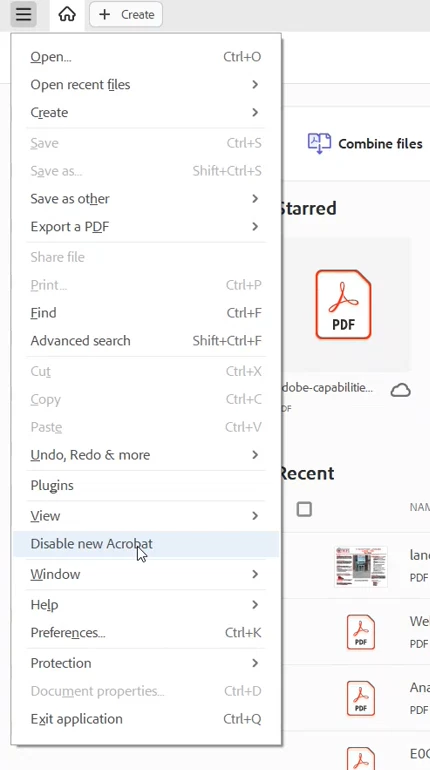
Disable the new UI:

20 replies

Participant
January 8, 2024

All I can say is IDIOTS!!  How can a major software company release an update with functionality taken away?  Obviously a programming shortcoming in the updated software.

Inspiring
January 8, 2024

Just "Disable New Acrobat" and your files will open separately.

Participant
January 8, 2024

Yes, I am fully aware of that.

Participant
January 6, 2024

I have this same issue with current Acrobat version 2023.008.xx, option not available:


Mac Pro desktop running Mac OS X Monterey, v 12.7.xx

Inspiring
January 8, 2024

Just "Disable New Acrobat" and your files will open separately.

Known Participant
January 9, 2024

Thanks @C.W.McCall.  People are specifically looking for a way to do this without disabling New Acrobat and its new features and UI. The instruction you provided requires rolling back to a previous (non-new-Acrobat) version, which is not acceptable for the future.

Participant
December 13, 2023

It is actually simple once you know how. I researched and nothing helped but finally stumbled upon the solution: when you have more than one documenbt open but all bunched in the same tab group merely go to "Window" in the menu at the top and scroll down to "New Window"  (on the mac its 8th from the top). When you hit this the document is moved from the group to its own window. Viola - but no thanks to Adobe.

Known Participant
December 13, 2023

@LouLiberty  your description is correct, but it requires extra steps to open each document in its own window.

Previously, Acrobat allowed configuration such that any document would automatically open in a new window. This flexibility has been removed from the current version, which is why people are complaining.

Participant
December 13, 2023

It is actually simple once you know how. I researched and nothing helped but finally stumbled upon the solution: when you have more than one documenbt open but all bunched in the same tab group merely go to "Window" in the menu at the top and scroll down to "New Window"  (on the mac its 8th from the top). When you hit this the document is moved from the group to its own window. Viola - but no thanks to Adobe.

Known Participant
December 7, 2023

Adobe Acrobat 2023 ("New Acrobat") needs the option to open each document in a new window.


This should be possible without disabling New Acrobat.

Participant
December 9, 2023

100% agree.  I am glad that disabling the new adobe acrobat is an option! 

Participant
November 14, 2023

If you have Office 365/One Drive, you can right click the 2nd file and choose view online.  I just did this and have the 2 documents side by side (on a 27" screen).

Participant
October 19, 2023

ADOBE--You need to fix this.  If I wanted to see all my documents in the same Window, I would run MS-DOS, not MS-Windows.  It's not 1994 anymore.

Participant
October 24, 2023

Agreed - this is really annoying. Adobe please fix this ASAP.

Participant
August 7, 2023

How to open Adobe 

Participant
June 19, 2023

I also do NOT like this new version of Adobe Pro. They change the whole interface but to me it's not user friendly. In addition to the inability of set preference to open documents in new windows, I have been having problem where I select 'Add text comment', instead of the function being ON and I can just click anywhere and start typing comment, I now have to reselect the function everytime before inserting comment at a new spot. Anyone experiences this issue?

Abambo
Community Expert
Community Expert
June 20, 2023
quote

(…) In addition to the inability of set preference to open documents in new windows, (…)


By @Tri30591967qvqy

This doesn't work for you? https://community.adobe.com/t5/acrobat-discussions/how-do-i-open-pdf-s-in-separate-windows-in-adobe-acrobat-standard-23-001-version/m-p/13728959#M408015

ABAMBO | Hard- and Software Engineer | Photographer
Participant
June 20, 2023

Ended up going back to the previous version. Thanks Tri30591967qvqy 

Abambo
Community Expert
Community Expert
April 16, 2023

Uncheck “Open Documents as new tabs...”


ABAMBO | Hard- and Software Engineer | Photographer
Participant
May 17, 2023

Is there another way to access this option.

Dave__M
Community Expert
Community Expert
May 17, 2023

Wow - that's surprising to see (or not see) the settings!  Does anyone else have this version to check the prefs?

My best,

Dave