


Participant
April 6, 2023
Answered

How do I open pdf's in separate windows in Adobe Acrobat Standard 23.001 version?

  • April 6, 2023
  • 20 replies
  • 216150 views

The option is not there in Preferences -> General. Please let me know, I dont like them opening in new tabs in the same window, I want them to open in different windows.
Correct answer Bernd Alheit

I run the Adobe Acrobat Pro, Version 2023.001.20174, and have the same problem. The version allows to tear the tab of the main document window to create a new window, but there is still not an option in preferences->general to check/uncheck open documents in tabs.


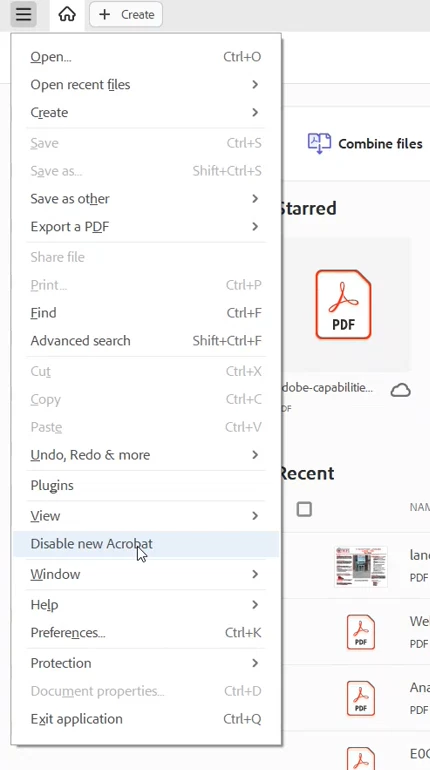
Disable the new UI:

20 replies

Participant
January 8, 2025

I have disabled new Acrobat and unticked option "open documents as new tabs in the same window (requires relaunch)" and documents continue to be opened as new tabs, not new windows.

Relaunches include closing Acrobat and retarting PC. However when I navigate back to Edit, Preferences, General, the box defaults to ticked option "open documents as new tabs in the same window (requires relaunch) "

This is so annoying: I only ever want new windows, I have never wanted new tabs.

Participant
May 22, 2024

When I uncheck disable new acrobat, I get a warning that reads "To disable the New Abrobat experience, restart the app.  Diabling the new experience will no longer grant you access to agreement drafts and templates.

What are agreement drafts and templates?  How do I know if I care that these features are disabled?  


Participant
April 12, 2024

I found the bug report/feature requestr site for Acrobat. Everyone, please setup an account and vote for these previously submitted Feature request / Bug reports and mark them as 'Critical'. The more Critical votes we get on these, the more attention the issue will get.

1. Request: Option to disable tabs: https://acrobat.uservoice.com/forums/590923-acrobat-for-windows-and-mac/suggestions/46894150-request...

2. Don't take away "Open documents as new tabs in the same window": https://acrobat.uservoice.com/forums/590923-acrobat-for-windows-and-mac/suggestions/46813747-don-t-t... 

3. Open multiple files in separate windows, not as tabs in single window.: https://acrobat.uservoice.com/forums/590923-acrobat-for-windows-and-mac/suggestions/47049442-open-mu... 


Anyone have any info on if/when Adobe plans to force the new UI on us?

Participant
April 12, 2024

OUTSTANDING! Thanks for sharing those links. "Critical" done.

Participant
April 6, 2024

The following steps:

1- Click in the pdf window on the blue round image (user);

2- Click the round iten, and it will "pop up":

"Account owner name", -

"e-mail address", -

"Adobe Account" and, below, the items:

"Preferences"

"Log off"

3- Click "Preferences"

4- Click in categories "General"

5- in Tools --"Uncheck 11th line"

Open documents as new tabs in the same window (Requires restart)

Inspiring
April 7, 2024

What the does this post by Roger Karam - "blue round image", etc. - mean???

Trying to understand this post but can't.  

Can anyone interpret? 

Participant
April 8, 2024

It's just a roundabout way of getting into Preferences — same as clicking on Preferences in the main menu. And we've already determined that the new Acrobat doesn't have an "Open documents as new tabs in the same window (Requires restart)" option, so he isn't contributing much.

Participant
February 20, 2024

Thanks for the tip. went back to the old version!

Participating Frequently
January 19, 2024

Ugh, I forgot to mention one other point, which goes to my question whether Adobe even reads this commentary.  This stream/the initial question, is marked "Solved."  It is not "solved."  Reverting to a previous interface is not "solved."

Participating Frequently
January 19, 2024

I have a previous reply to this question, but I feel compelled to add to it.


First, I wonder if the Adobe engineers or at least someone at Adobe looks at these.  One would think so.  I think I will screenshot all the commentary and find a way to email it to them.


Secondly, and most importantly, and as a follow up to my previous shout out to the community about it, if somebody knows whether it is possible to get the "open" button back on the menu bar, please tell me.  I love it so.  I know it is neurotic behavior and evidences a mental health issue or at least points to a latent one, but the inability to have an "open" but bothers me immensely, like absurdly so.  The thing is, it really does.  I'm afraid I'm going to start having nightmares where an "open" button personifies and chases after me, and I can't get away no matter where I go.

Participant
January 19, 2024

Thank you so much!  I hate when an 'update' or whatever completely changes the look and how things work with no notice of what the updates are or what is changing. It was driving me crazy!

Participant
January 14, 2024

And equally annoying: while it's possible to tear off a tab to a new window, it's no longer possible to drop it into an existing window. I frequently work with a hybrid of separate windows and tabs, because I have Acrobat windows on multiple monitors but want the PDFs to be easily accessible by tabs in each window, not hunting through a dozen separate windows for the one I want. It helps when I can reorganize my tabs between windows.


This is not a new concept — the old Acrobat allowed me to drop a tab into another window — and it's not an obsolete one either, as any web browser will show you. 😒


I'm staying with the "new" Acrobat because I have coworkers using it, and it's easier to answer questions when I know where the heck things have been moved to. (Which to me is totally gratuitous, since I've yet to see any new functionality — or even changed functionality! — in the new version. It's just a UI shuffle. Bravo, Adobe. 🙄)

Participant
January 10, 2024

This worked.

Known Participant
January 10, 2024

@Buckley25381968lzef- it works, but it reverts your entire Acrobat application to a previous version, removing the benefits of other innovations available in the new version.