


ThePiachu
Participant
June 13, 2025
Answered

How do I revert to the old view?

  • June 13, 2025
  • 1 reply
  • 431 views

I recently installed Acrobat on my Windows 11 machine and I hate the new view / layout. I want to see the document outline on the left, page display controls on top, and in general I want to have things look the way they used to.


I tried searching around for an answer on how to revert Acrobat to the old view. I found some solutions - https://community.adobe.com/t5/acrobat-discussions/how-do-i-go-back-to-the-old-acrobat/td-p/14032104 , but it seems those old answers don't work anymore in the new version of Acrobat, there is no "Disable new Acrobat" option under "View" anymore...
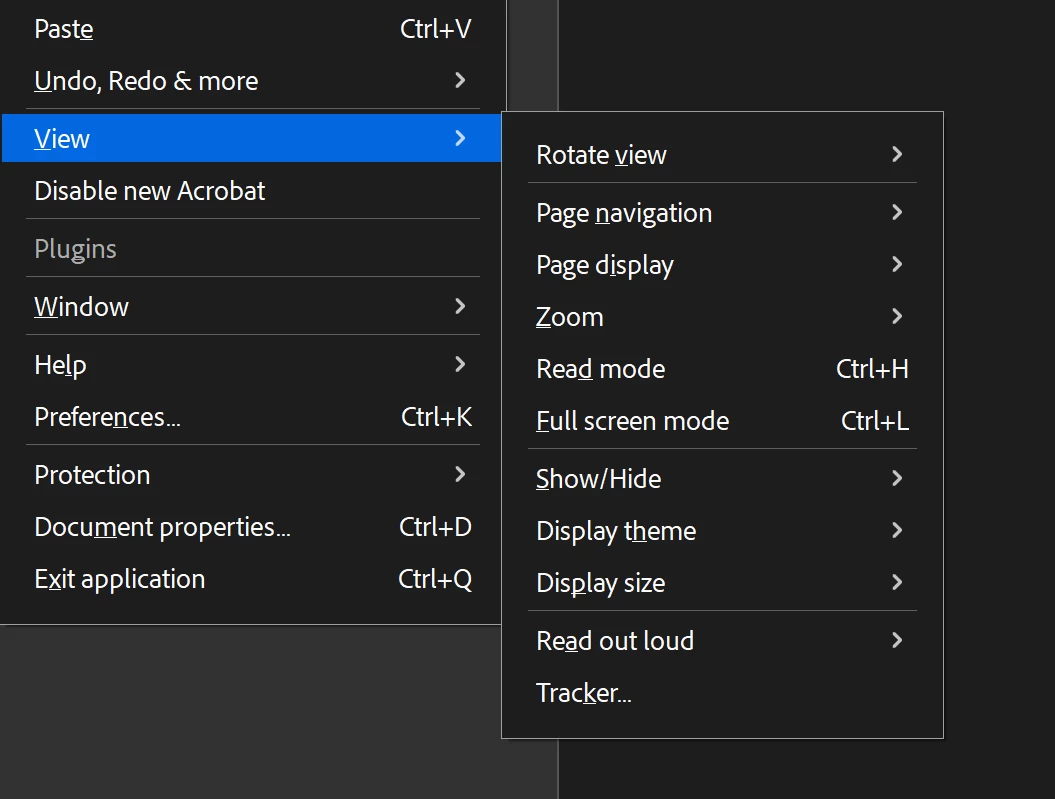
 

So how do I make things work the way they used to?

Correct answer Tariq Ahmad

Hi @ThePiachu


Please check the highlighted section of the screenshot you shared. It is on the first menu, just under the View option: "Disable new Acrobat."

Let us know how it works. 


Feel free to reach out if you have any questions.


~Tariq

1 reply

Tariq AhmadCommunity ManagerCorrect answer
Community Manager
June 13, 2025

Hi @ThePiachu


Please check the highlighted section of the screenshot you shared. It is on the first menu, just under the View option: "Disable new Acrobat."

Let us know how it works. 


Feel free to reach out if you have any questions.


~Tariq

ThePiachu
ThePiachuAuthor
Participant
June 13, 2025

Ah, this is exactly what I needed! Nothing like my brain not noticing the option has been moved one level up :D.


Thank you for the help!