


How do I stop the highlight tool from making boxes and creating comments?
I want to highlight the old way and I can’t anymore. I want to highlight text that has been OCR’ed from a scanned document or other documents containing text. At one point I was able to do this with some but not all documents. Now I can’t highlight text the right way, even with documents I had been able to highlight before.
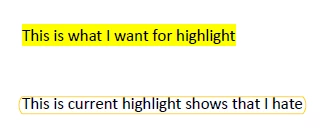
The problem is that when I use the highlight tool, it puts boxes around the highlighted text and makes it into a comment. All I want is to highlight. I already know how to make the ‘hate’ example have more opacity. For example:
Others have posted about this:
adobe acrobat dc highlight text option not making ... - Adobe Community - 13102524
Highlight tool is inconsistent - Adobe Community - 9501847
If we can’t fix it now, will going back to an older version of Adobe work?
 AdChoices