


Participant
May 27, 2022
Answered

How do I uninstall McAfee Security Scan Plus?

  • May 27, 2022
  • 12 replies
  • 60625 views

How do I uninstall the McAfee Security Scan Plus software Adobe Acrobat DC installed without my permission on Windows 10?


The Uninstall option is grayed out in Windows Settings -> Apps & Features. McAfee keeps popping up telling me I have a "potential" security threat and won't tell me what it is and directs me to the McAfee website to purchase it. Seems like a marketing scam to me. I don't appreciate Adobe doing this. 
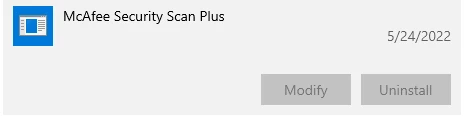
Correct answer Schmedly

I too had this problem and after reading several complex solutions that included multiple reoboots and manually editing the Windows registry, I stumbled across this simple solution:


1) In the search bar next to the Windows icon, type in 'mcafee' (yes, lower case).

2) A list of your apps should come up, but under a file tree different than the standard uninstall control panel.

3) Click on Mcafee Security Scan Plus, and the uninstall button should magically appear.

4) Click uninstall, and the program should now be removed.

5) Finally, go back to the search bar and again type 'mcafee' - a shortcut remains which can now be removed as well.


Hope this works for you too!

12 replies

Participant
July 15, 2025

Totally unacceptable that McAfee downloaded itself when I downloaded Reader just now. 


I have paid $60 a month for this trash service and I am outraged by Adobe's constant efforts to undermine my work.


THis company is garbage and builds products so that they are sluggish trojans focused on chiseling extra money out of paying customers. I want to talk to someone from Adobe about this and am going to start posting daily about the experience using an automated process. Adobe lies constantly and delivers an absolutely trash experience for the money.

S_S
Community Manager
Community Manager
July 15, 2025

Hi @calivision,


Hope you are doing well. Sorry for your experience with downloading Reader.


Acrobat Reader is a free application. Could you tell us about the charge you are referring to? 

If you have a paid subscription, you should receive an option to download the application directly in the purchase acknowledgement email.


Apart from this, you can also download the installer without the add-ons from here: https://adobe.ly/3TDvw8r


Hope this helps.


Regards,
Souvik.

Participant
May 7, 2025

Holy cow how is this still happening in 2025?!? I just wanted reader, it started to install some macafee thing with NO WAY to stop it, had to end task in the middle of the install. This is what I get for not using a 3rd party reader! Installing unstoppable shovelware in 2025 from ADOBE?! I want out of this adobe ecosphere so bad

Participant
February 26, 2025

I just came from this post : https://community.adobe.com/t5/acrobat-discussions/why-on-earth-is-mcafee-being-installed-when-i-attempt-to-update/m-p/11407968

I really can't believe that Adon are shovelliong this sihte out with Reader.  It's been proven to be malware.

I'll be finding an alternative to Adobe Reader now and have completley lost my trust in Adobe.

I registered to simply make this comment - so annoyed right now.

Participant
June 20, 2024

uninstall a McAfee Security Plan

Known Participant
June 17, 2024

PDFGear is a great alternative to adobe scamming you into installing malware like mcafee. 

Participant
January 24, 2024

I've finally found the easiest way to uninstall this garbage McAfee Security Scan Plus, when the small screen popped out, press then you'll see the uninstall.


Participant
February 24, 2024

this is all I can see on the popup. thank you for any info!

Participant
May 13, 2024

The only way I could uninstall the program was to use Wise Uninstaller and use the Force Uninstall option.


Participant
April 26, 2023

I am having the same issue and will be trying the ideas suggested herein.  But I'm using my Reply to add my voice in complaint to Adobe.  I'm a longtime user of Reader and I prefer it even to my company-furnished speciality PDF software - I use Reader in concert w/ those.  I've installed it many times, but only this most recent time on a new computer in 2023 did I get stuck by this MacAfee trap.  Perhaps I inadvertenly toggled on the MacAfee option during Reader download - I don't thinks so (and wouldn't do so on purpose) but can't rule out. However, I do find in Googling that sometimes I see the MacAfee option on the Reader download page, and sometimes not (?).  More importantly, MacAfee actively resists efforst to uninstall - so far I can't prevent period pop-up messages even after my uninstall.  Beyond that, MacAfee is also now email blasting me without an Unsubscribe option.  Not sure why reputable Adobe would partner with the unprofessional and reckless MacAfee; MacAfee's unwanted security software is the *only* malware on my computer - sigh.  Please, Adobe, make MacAfee furnish a 100% removal tool right there on your Reader download page.  Thank you.

Participant
April 25, 2023

Many thanks! Works like a charm!

TH Khor

Participant
August 26, 2022

Thanks much, this work very simply.

Participant
September 30, 2022

Worked for me too.

I've been burned by Adobe before with auto install, just forgot. I hope Adobe is using the money it received for this wisely. It's a frustration for its customers.

SchmedlyCorrect answer
Participant
July 29, 2022

I too had this problem and after reading several complex solutions that included multiple reoboots and manually editing the Windows registry, I stumbled across this simple solution:


1) In the search bar next to the Windows icon, type in 'mcafee' (yes, lower case).

2) A list of your apps should come up, but under a file tree different than the standard uninstall control panel.

3) Click on Mcafee Security Scan Plus, and the uninstall button should magically appear.

4) Click uninstall, and the program should now be removed.

5) Finally, go back to the search bar and again type 'mcafee' - a shortcut remains which can now be removed as well.


Hope this works for you too!

Participant
August 18, 2022

Thank you very much. Your simple but hard to find solution worked for me. There are lots of programs offered on the web to solve this problem but I believed the medications would be worse than the disease. The unwanted McAfee program poured into my system while downloading Adobe Acrobat. I lost hours trying to get help from Adobe chats without success. I was a loyal Adobe Premiere customer until this incident. I will now move away from all Adobe products. I am now making my first tutorial to use the free version of Da Vinci Resolve  Editor from Blackmagic