
Participating Frequently
June 28, 2017
Answered

How do you create a link to a specific page in another pdf?

  • June 28, 2017
  • 1 reply
  • 8652 views

Hello, using acrobat pro 11.  I go to tools>content editing>add or edit link but nothing in there seems to allow me to have my link point to a specific page in another pdf. I can have it point to a specific page in the existing pdf but not another one. Does that setting exist?
This topic has been closed for replies.
Correct answer Karl Heinz Kremer

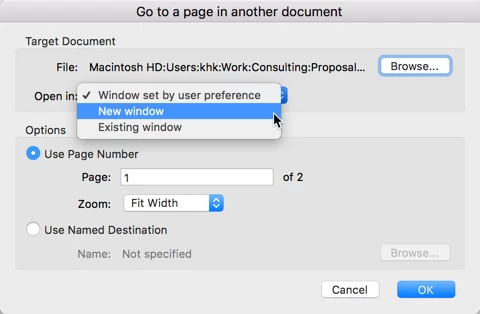
When you edit the link (after you've created it - this is unfortunately not possible when you first create it), you can then select in what window the linked document should be opened:

When you select "New window", then your first document will remain open, and the target document will be opened alongside the first.

1 reply

Karl Heinz  Kremer
Community Expert
June 28, 2017

You set the link to an external file the same way you would to a page in your current file (via the "go to page view" function). The key is that you have both PDF files open at the same time, and that they are both in the correct relative position to each other on your disk (e.g. in the same directory, or one in a subdirectory relative to the first one, and so on). When it's time to set the link target, just switch to the 2nd PDF file and go to the correct page, then click on the "Set link" button.

whusytteAuthor
Participating Frequently
June 28, 2017

Thanks Karl but I tried that---the problem with that is even if I have both pdfs open, when I click on the link in the first document it closes the first document and replaces it with the second document. So basically, when I click on the link I now have 2 versions of the second document open. Is there a way I can do it but keep both pdfs open?

whusytteAuthor
Participating Frequently
June 28, 2017

On your computer, you can set your default to "open in a new window", but when you distribute these files, it all depends on what the receiving computer is set to. Only if you explicitly set the link action to "open in new window", will the system default be overridden.

There are 3rd party software packages that allow you to set all links to always open in a new window. Adobe Acrobat unfortunately does not have that functionality.


Sorry, maybe I wasn't clear...do I have to go through the extra step of editing the already-created link every time I create one to make each link open in a new window or is there a way within acrobat to tell it to open in a new window every time I create a link? 

If you answered that question when you said "On your computer, you can set your default to open in a new window"...where can I do that on a Windows 10 machine?