


New Participant
June 27, 2025
Question

How do you get rid of this error message

  • June 27, 2025
  • 3 replies
  • 2579 views

I keep getting the following Application error message:

The instruction at 0x00007FF82D73D24D referenced memory at 0x00000000000000018. The memory could not be read. 
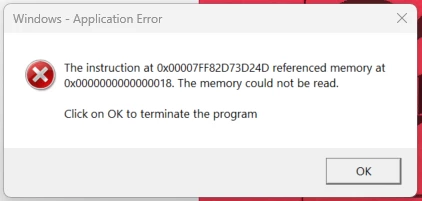
How do you stop this from popping. I have done the repair option. Uninstalled and re-installed. Uninstalled>deleted all things Adobe, and reinstalled with no change in the situation. Seems to pop when opening a PDF from Outlook. Running Windows 11, New Outlook, and latest version of Adobe.

3 replies

Community Manager
June 30, 2025

Hi @apodacajctx

Sorry for the troubled experience, and thank you for reaching out. 
This issue is known to us and the product engineering is working to triage this issue on priority. 


~Tariq

New Participant
August 1, 2025

is there an ETA for when there will be a fix for this ? 

S_S
Community Manager
Community Manager
August 4, 2025

Hi @kwaku_1010,


No updates yet! 


We will update the thread once the fix is live. 


Your kind understanding and patience is highly appreciated.


Regards,
Souvik.

New Participant
June 30, 2025
quote

I keep getting the following Application error message:

The instruction at 0x00007FF82D73D24D referenced memory at 0x00000000000000018. The memory could not be read. 

How do you stop this from popping. I have done the repair option. Uninstalled and re-installed. Uninstalled>deleted all things Adobe, and reinstalled with no change in the situation. Seems to pop when opening a PDF from Outlook. Running Windows 11, New Outlook, and latest version of Adobe.

peryourhealth
By @apodacajctx

That "memory could not be read" error, especially when opening PDFs from Outlook, points to a memory access violation likely caused by an interaction conflict rather than just Adobe itself, given your extensive reinstallations. To stop it, focus on **Outlook's PDF previewer** (try disabling it or changing the default PDF handler temporarily), **updating your graphics drivers directly from the manufacturer's website** with a clean install, or checking for **system file corruption** using SFC and DISM. Also, consider if **conflicting software**, like antivirus, is interfering. Since Adobe-specific fixes haven't worked, the issue is probably rooted in how these system components interact.

creative explorer
Community Expert
June 30, 2025