New Participant
March 28, 2017
Answered

How do you rotate documents?

  • March 28, 2017
  • 6 replies
  • 12666 views

The old version it was easy to rotate dociments that were sent to you in PDF format  - this version is horrible

I dont want to pay for something that everyone needs to use - can someone plese tell me how to rotate a document

This topic has been closed for replies.
Correct answer Dave__M

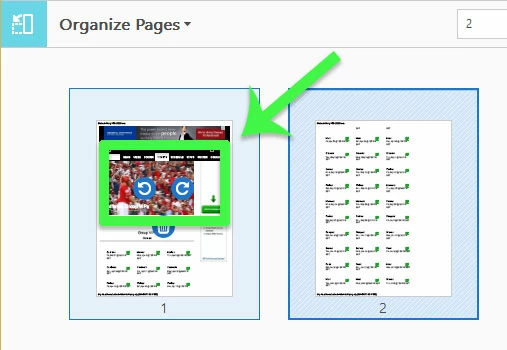
Take a look at my screenshots below.  This first one shows the rotate page buttons while hovering in Acrobat Pro's Organize Pages tool.  Do you see the same thing?
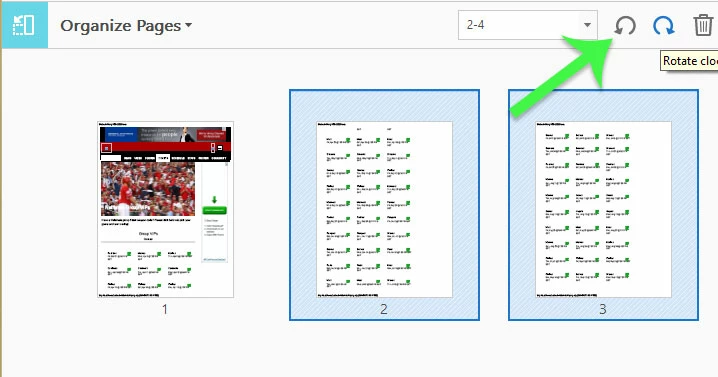
When selecting multiple pages, I use the Rotate Pages button shown below that will be in the toolbar:
Do you not see these features in your installation?  If they are missing, there is a Repair Installation command under the Help menu that could maybe repair a faulty installation of Acrobat Pro DC.

Let us know what you see, or don't see if your screen shows different than my screenshots.

My best,

Dave

6 replies

Brainiac
January 5, 2018

There are many opinions on the new interface, but (once you’ve found Organize Pages) the rotating pages stuff has t changed.

Brainiac
January 5, 2018

They didn’t change it significantly since 1.0!

Participating Frequently
January 5, 2018

I'm new to Creative Cloud... I've been on CS5.5 until about 3 months ago. The new acrobat User Interface is horrid in my opinion. Thanks for your help again!

Abambo
Community Expert
January 6, 2018

The user interface is different. But when you get used to it, some operations are easyer to perform.

ABAMBO | Hard- and Software Engineer | Photographer
New Participant
March 31, 2017

Action:  "Organize Pages"

Hover over the page that you want to rotate.

Ctrl + S to save.

Dave__M
Dave__MCorrect answer
Community Expert
March 31, 2017

Take a look at my screenshots below.  This first one shows the rotate page buttons while hovering in Acrobat Pro's Organize Pages tool.  Do you see the same thing?

When selecting multiple pages, I use the Rotate Pages button shown below that will be in the toolbar:

Do you not see these features in your installation?  If they are missing, there is a Repair Installation command under the Help menu that could maybe repair a faulty installation of Acrobat Pro DC.

Let us know what you see, or don't see if your screen shows different than my screenshots.

My best,

Dave

Brainiac
March 29, 2017

Sounds as if you have the free Reader. Understand that Acrobat Pro is not free. Read the reply carefully, it tells you one thing for Reader, and another thing for Pro.

You could also try answering my questions, which I asked so I could give you better, more accurate, advice, and not waste your time.

Dave__M
Community Expert
March 29, 2017

If you are using Reader to open your PDF docs, you can not rotate pages.  You can only rotate your view. Think of this as a book sitting on a 'lazy susan'.  You can spin it around to look at it in any way, but it doesn't change the book at all. See screenshot below.

If you are using Acrobat Pro to view your PDFs, you can select rotate any page or page range from the Pages panel. Once rotated (and saved) the change is made to the file itself.  See screenshot below.

I hope this is helpful.

My best,

Dave

New Participant
March 29, 2017

not with the DC version

Brainiac
March 28, 2017

Perhaps you could tell us:

1. What is this "Adobe" you are using. Product name and version please, as shown by About.

2. How did you used to rotate pages, and what product did you have before?

3. Do you want a permanent rotation (that is saved) or just a rotate on screen for now?

New Participant
March 29, 2017

I am using the DC version and it does not allow you to use as per your illustrations
