benyig
Known Participant
December 3, 2022
Answered

How to add page display buttons to toolbar in the new interface?

  • December 3, 2022
  • 3 replies
  • 5416 views

Hello,


I'm trying to add page display buttons to the toolbar but I cannot find them in the toolbar customization menu. Are they really not included anymore?

Correct answer Bernd Alheit

Where?


3 replies

JR Boulay
Community Expert
Community Expert
January 19, 2023

AkanchhaS


Acrobate du PDF, InDesigner et Photoshopographe
mlager
Participant
March 20, 2024

Why is the All Tools column blank on the Acrobat reader in the new layout

JR Boulay
Community Expert
Community Expert
December 17, 2022

How can I get an Acrobat version with the new interface?


Acrobate du PDF, InDesigner et Photoshopographe
AkanchhaS8194121
Legend
January 19, 2023

@JR Boulay 

I can see the version in mine under Help>About Acrobat Pro


~Akanchha 

AkanchhaS8194121
Legend
December 11, 2022

Hi @benyig 


Sorry for the delay in response. 

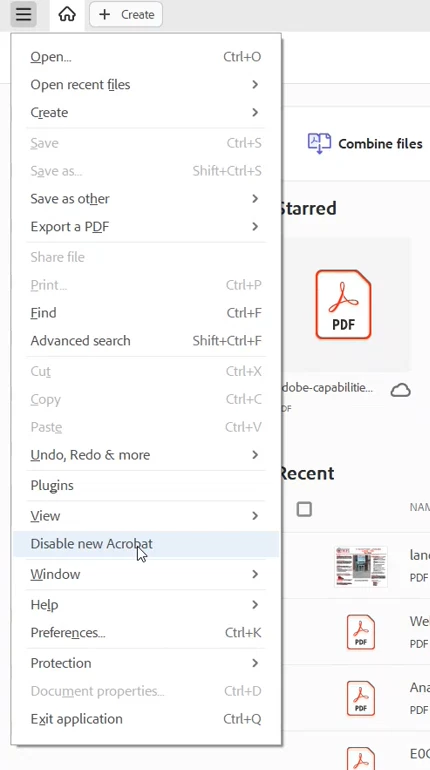
Are you working on the new interface of Acrobat? If yes, do you see the option in Help menu to go back to old interface?

After switching to old interface do you get the Page Display menu back?


If this didn't help then, right click on ToolBar and take a screenshot of the ToolBar menu, what does that list shows? 


Thanks,

Akanchha 

benyig
benyigAuthor
Known Participant
December 17, 2022

Thank you for your reply! Yes, it's the new interface. Is this functionality not implemented in the new interface? 

benyig
benyigAuthor
Known Participant
January 22, 2023

Hi @benyig 


Sorry for the delay in response to your follow-up question.

The functionality is there. Just the positioning is changed. It's all in one place. And for the shortcut icon, check the second screenshot.


For more details: you can go through this What's New in Acrobat page https://helpx.adobe.com/acrobat/using/whats-new.html 


Thanks,

Akanchha


Thanks for your reply. Unfortunately, it doesn't answer my initial question. The toolbar in the older versions was customizable, I could have a single icon there to switch to the two-page view if I wanted. There was no need to go into any menu or submenu. That's the functionality that I'm missing now. Even in your second screenshot, the two-page view mode is not even in the shortcut menu. But even if it was, it's not really a shortcut if I have to open a menu to reach it.