


Exit
  • Global community
    • Language:
      • Deutsch
      • English
      • Español
      • Français
      • Português
  • 日本語コミュニティ
  • 한국 커뮤니티
1

How to change background fill color of Text of Sticky Notes? to distinguish it from non-Sticky Notes

Contributor ,
Jan 26, 2023 Jan 26, 2023

How to change background fill color of Text of Sticky Notes?

As-Is, it is indistinguishable from Background Color of non-Sticky-Notes;

Currently, to make Sticky Note standout, I have to recolor it with another App
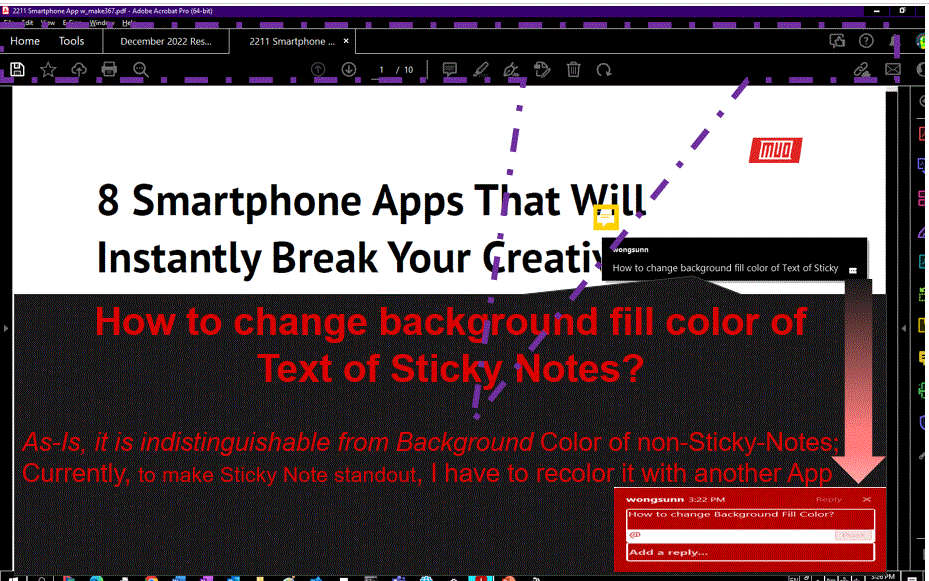
230126 Adobe How to change background fill color of Text of Sticky Notes.gif

TOPICS
How to , Standards and accessibility
1.4K
Translate
Report
Community guidelines
Be kind and respectful, give credit to the original source of content, and search for duplicates before posting. Learn more
community guidelines
Contributor ,
Jan 26, 2023 Jan 26, 2023

For majority of my use, I probably use Microsoft Apps more than Adobe for Comments because Sticky Notes need more work such as

  1. Background Fill Color need another App to recolor
  2. precision of Position  
Translate
Report
Community guidelines
Be kind and respectful, give credit to the original source of content, and search for duplicates before posting. Learn more
community guidelines
Community Expert ,
Jan 26, 2023 Jan 26, 2023

The color of the callout text is the same as that of the sticky note itself. To change it select the comment and press Ctrl+E to open the Properties toolbar, and there you'll be able to change it.

Translate
Report
Community guidelines
Be kind and respectful, give credit to the original source of content, and search for duplicates before posting. Learn more
community guidelines
Contributor ,
Feb 02, 2023 Feb 02, 2023

Thanks, but does this change Background or Fill Color rather than Font Color?

Reasons for asking IMHO which is more effective to get attention:

  1. Background of Font has much larger area than Font and is more effective, particulary for heavy documents like Finance Spreadsheet.
  2. Background Color Change allows me to increase contrast of Font Color and there enhance legibility of Text  
Translate
Report
Community guidelines
Be kind and respectful, give credit to the original source of content, and search for duplicates before posting. Learn more
community guidelines
Community Expert ,
Feb 03, 2023 Feb 03, 2023

If you want to change the text color highlight it before pressing Ctrl+E and you'll see that option appear, too.

Translate
Report
Community guidelines
Be kind and respectful, give credit to the original source of content, and search for duplicates before posting. Learn more
community guidelines
Contributor ,
Feb 05, 2023 Feb 05, 2023

Thanks, I now understand more about Adobe comment features

  1. Comments by multiple persons
  2. Content is no edited; recipient prefer Full Comment positioned in front (hiding part) of its Content 
  3. No response to my comments.


This is for Content that needs ancillary changes and recipient of my Comments have no time to respond.


For Adobe as-is, it take me much labour to do above; example is comment in-place is singular.

Therefore, Microsoft Office is my choice for above scenario.

  1. Comments by me only
  2. recipient of my Comments typically do not respond and 
Translate
Report
Community guidelines
Be kind and respectful, give credit to the original source of content, and search for duplicates before posting. Learn more
community guidelines
Contributor ,
Feb 05, 2023 Feb 05, 2023

This is to correct above editing mistakes. My use is as follows: Comments by me only, Recipient prefer Comments  than Content; example is all Comments shown in place and all Text not hidden;  content can be partially hidden by Comment in place ; since there is no response to  comments, Comment are typically less than one short sentence

With above use case, IMHO, Microsoft Office Apps is more efficient.

Translate
Report
Community guidelines
Be kind and respectful, give credit to the original source of content, and search for duplicates before posting. Learn more
community guidelines
Contributor ,
Feb 05, 2023 Feb 05, 2023
LATEST

Please see following comment to correct my edit error.

Translate
Report
Community guidelines
Be kind and respectful, give credit to the original source of content, and search for duplicates before posting. Learn more
community guidelines