


May 3, 2019
Answered

How to change default message when sending a file for signature?

  • May 3, 2019
  • 3 replies
  • 6165 views

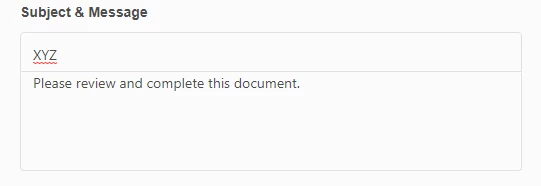
How do I change the default message when I'm sending a file for a signature? By default it says " Please review and complete this document".

I want to customize that message to my own words so I can stop having to type it every time.
Correct answer AkanchhaS8194121

Hi there,

We apologize for the delay in response to your query.

If you are referring to the default message which reflects when you send a document for signature (as shown in the screenshot below), then sorry to say, that is not possible to change the message by default. You have to enter it manually while sharing file for signature.

Note: The message template feature is available in business level account. Individual accounts doesn't have this feature available.

Hope this answers your query.

Thanks,

Akanchha

3 replies

Participant
April 3, 2024

At least it says "Please" in English. The default text in Spanish is "Revisa y firma el acuerdo", it could not be more rude.

Participant
September 19, 2023

agree!   the sentence itself is flawed...review and COMPLETE?   I have to type in review and "SIGN"  every time.  this needs to be a template I can revise once


Participant
November 2, 2023

C'mon Adobe, how many people need to ask before you update this, it's enough to want to change to a new product. Now I notice you state 'Agreement' I preferred 'Document' at least that was correct if not ideal, but Agreement - I have to retype every single time and it's too time consuming in my line of work as I send out numerous each day


AkanchhaS8194121
AkanchhaS8194121Correct answer
Legend
May 17, 2019

Hi there,

We apologize for the delay in response to your query.

If you are referring to the default message which reflects when you send a document for signature (as shown in the screenshot below), then sorry to say, that is not possible to change the message by default. You have to enter it manually while sharing file for signature.

Note: The message template feature is available in business level account. Individual accounts doesn't have this feature available.

Hope this answers your query.

Thanks,

Akanchha

Participant
May 20, 2023

It is stated above that the message template feature is available in business level accounts. When I look at the available plans, I see team & enterprise accounts, no business accounts. Does the team plan include the option to change the default message when sending a document for e-siqnature?


Judy Martin

Participant
May 29, 2023

I have a Teams Subscription and I cannot find where to change this message. Presently, I have to do it manually every time I send out a document for signature.