


lcperkins
Participant
July 18, 2019
Question

How to change location of call out arrow where it attaches to the text box?

  • July 18, 2019
  • 2 replies
  • 11736 views

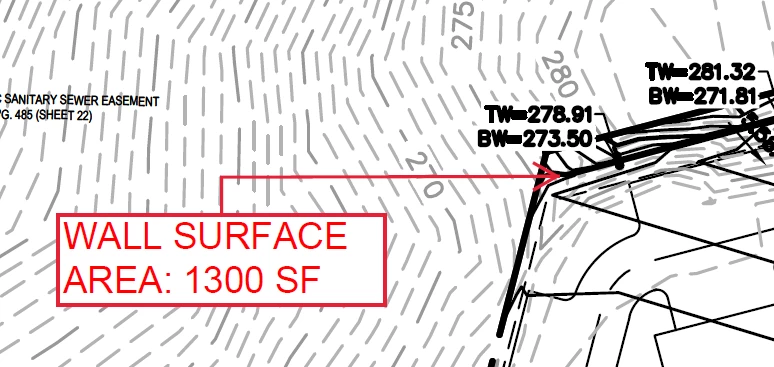
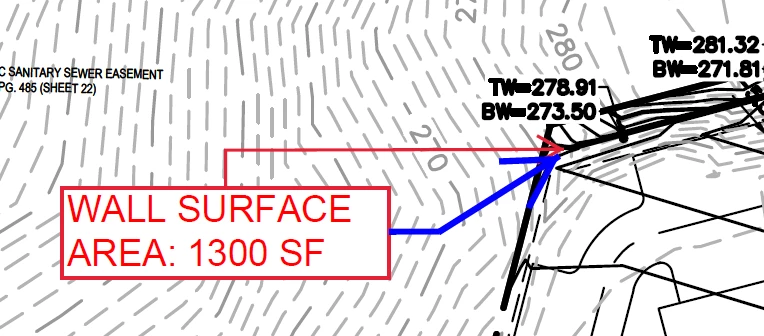
I am marking up a PDF if Acrobat and I am having trouble changing where the arrow meets the call out text box. It appears to default to the top or bottom and will not attach to the side of the box unless the arrow is pointing directly to the left or right of the text box. I've been using acrobat for years and until the past year or so haven't noticed a problem with this. Is there a preference I can change to address this? Pictures below for reference. The first image is how the callout defaults and I cannot find a way to change it. I am trying to change it to something like the blue arrow in the second image, which makes more sense angle-wise and is more visually appealing. Any suggestions??
This topic has been closed for replies.

2 replies

Participant
March 30, 2020

OK this has plagued me forever and I finally get it.  There are two different types of drag. The first is if you select the box, hover over the perimter until you get the crosshairs, then click (hold) and drag.  This will move the box, arrow and keep the orientation between the two.  The other method is if you select the text box, then click on the center of the text and hold and drag.  This will only move the text box while keeping the arrow in place, hence changing the side your arrow originates from.

Participant
October 27, 2020

Okay, if this continues to work, then kudos to you!  This has bugged me for years and I just lived with it, repeatedly trying to move the text box until the arrow tip mysteriously stayed anchored.  I always assumed the Adobe fairy finally decided to grant my wish -- 😉 -- thanks for posting!

Document Geek
Community Expert
Community Expert
July 18, 2019

Try dragging the box over. There is no way to manually manipulate the arrow connection point, but it seems to have some sort of built-in snapping function, and the connection point changes depending on where the box is moved to. Click in the center of the box and drag it around til the connection point of the arrow snaps to where you want it to be.

Participant
May 24, 2021

It used to change sides automatically but now doesn't