


Participating Frequently
March 15, 2023
Question

How to change lpi settings in PDF from 85 to 150

  • March 15, 2023
  • 2 replies
  • 5456 views

I don't think anyone can help me but I wanted to try.

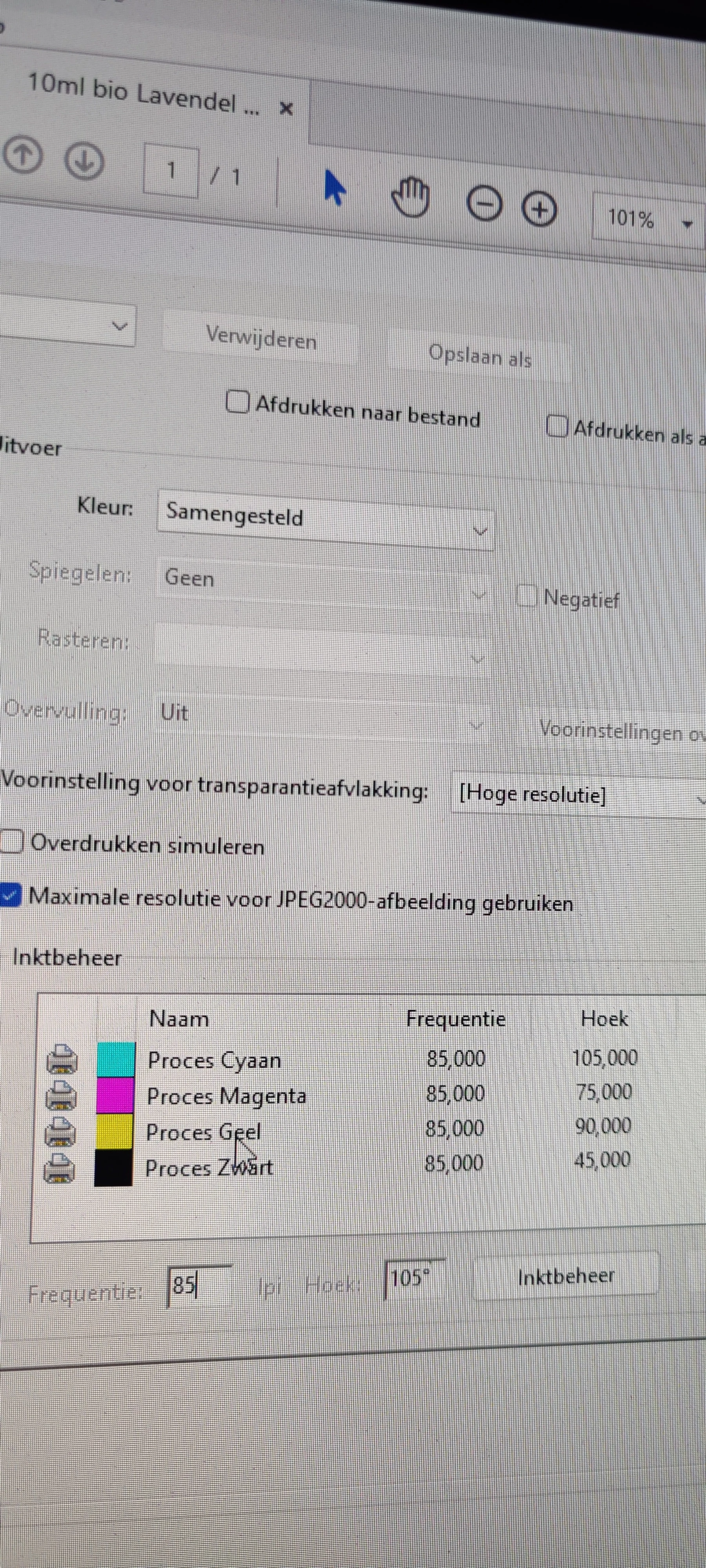
I don't know why but, when I go in advanced settings in PDF when I want to print the file. 


It says ink management and it says Proces Cyaan, Magenta, Yellow and black. But when I want to change the frequency from 85 to 150 LPI it stays the same. How can I change this. This is so frustrating me.


Before it worked to do it, unfortunately it is now not working anymore I have no idea why.


Please help!
This topic has been closed for replies.

2 replies

Brad @ Roaring Mouse
Community Expert
Community Expert
March 24, 2023

The ability to change line screens is dependent on the ability of the SPECIFIC (usually Postscript) printer. From your screen grab, you have a universal printer driver selected, so probably will not accept line screen changes as it doesn't have specific information about your printer's capabilities. Even if you can change the setting in Acrobat it doesn't mean the printer can (or will) do it. For instance, my Xerox PS printer has what's called a Halftone Lock (in its printer driver settings) which ignores any instructions in the print stream to change the line screen, as the printer's own halftone screen is optimized for best results.

Even if your printer is a one that allows overrides, the screens won't change unless you have selected "Emit Halftones" under Postscript Options.

What was your printer driver/system when you were able to do this before?

What is your EXACT printer?

Participating Frequently
March 31, 2023

Thank you for your message,


The driver system was the same I think, I struggled very hard tried many many things to change the lpi I don't know where I clicked but it changed to 150 and the little letters were sharp printed. And when I opened the page of PDF again I saw the lpi at 85 again and couldn't change it again.


My printer is: Kyocera - Ecosys - M5526CDW - All-In-One colour Laserprinter - 

Brad @ Roaring Mouse
Community Expert
Community Expert
March 31, 2023

Your screen grab had you printing via the HP Universal PS Driver... I doubt that is useful for a Kyocera.


Legend
March 15, 2023

Please send a screen shot - not a photo of the screen.

Participating Frequently
March 15, 2023

Why what does it matter? You see clearly on the picture what I mean. 

Legend
March 15, 2023

I can see what you think is important, but I can't see the other stuff that I think is important. Never mind.