


New Participant
June 21, 2024
Question

How to clean text in Acrobat comments?

  • June 21, 2024
  • 1 reply
  • 1012 views

Hello everyone,

Is there a way to convert texts that are transferred to the comment field when commenting into plain text, i.e. to filter out all breaks and, for example, conditional hyphens?
(Adobe Acrobat 2024.002.20857)
Here is an example:
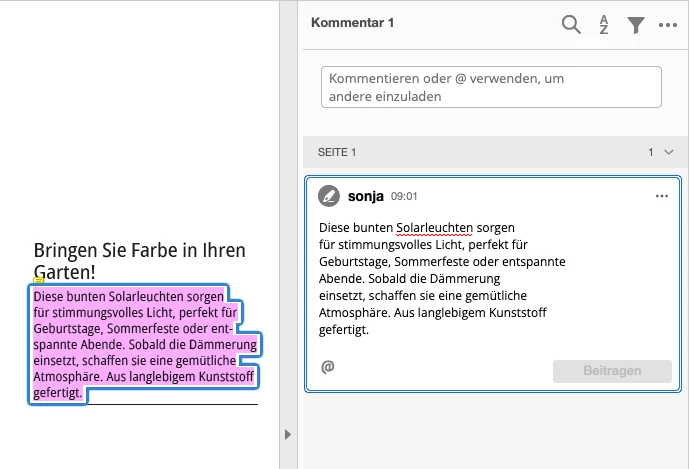
 

I was thinking that this could possibly be solved with a script embedded in Acrobat, but unfortunately I have no scripting experience.

Thank you very much for your help, 
Sonja


This topic has been closed for replies.

1 reply

try67
Braniac
June 21, 2024

Line-breaks can be removed using a script, yes. Not sure what you mean by "conditional hyphens", though.

Sonja0815Author
New Participant
June 21, 2024

sorry i think the correct term should be Discretionary Hyphen, which is used in indesign. 
unfortunately, i don't have any experience with scripts and i have only found different information on where to store a javascript so that it can be activated in acrobat. can you give me some tips?

try67
Braniac
June 21, 2024

No, it's not possible to do it like that.


In second thought, it is actually possible, but requires a much more complex script. If this is something you're interested in, contact me privately.